Make the Right Move: Proven Steps to Evaluate a Used, Second-Hand, Surplus, Pre-Owned Okuma LB 300-MY CNC Turning Center made in Japan
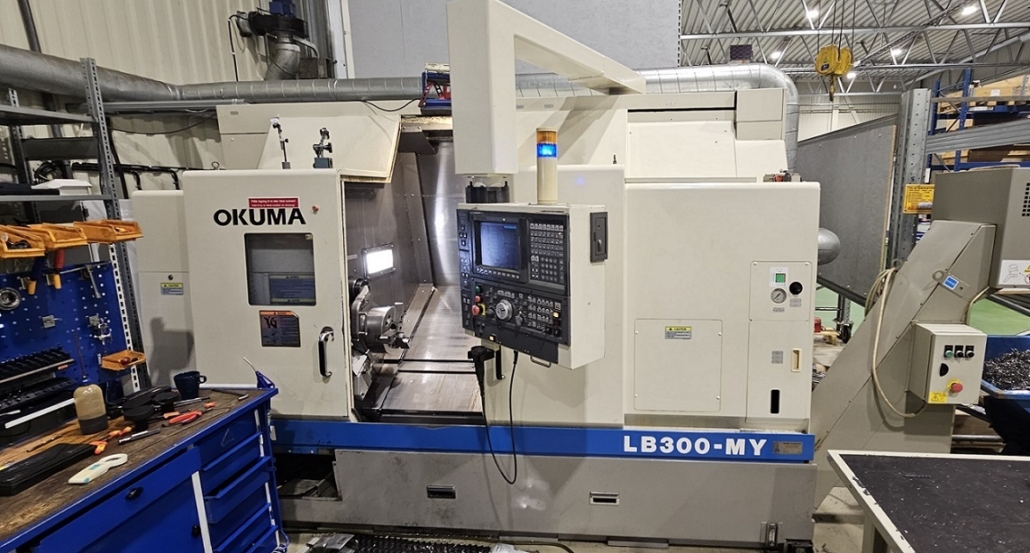
Below is a practical, professional guide to evaluating a used, second-hand, or surplus Okuma LB 300-MY CNC Turning Center (made in Japan), including key technical specs and step-by-step checks you should make before buying.
About the Okuma LB 300-MY CNC Turning Center
The Okuma LB 300-MY is a Japanese-made CNC lathe/turning center from a highly respected brand (Okuma). It’s used widely in industries (automotive, aerospace, precision parts) for reliable and accurate machining.
Typical Technical Specifications
Actual machine specs must be confirmed with the seller — these are typical values gathered from used machine listings.
Machine Type: CNC Turning Center
Brand: Okuma
Model: LB 300-MY
Control: Okuma OSP series (e.g., OSP-E100L or similar)
Max Turning Diameter: ~340 mm
Max Swing Over Bed: ~530 mm
Max Swing Over Cross Slide: ~420 mm
Center Distance (Z travel): ~500 mm
X Axis Travel: ~260 mm
Z Axis Travel: ~500 mm
Spindle Bore: ~80 mm
Spindle Speed: up to ~4500 rpm
Turrent: 12-station tool turret (VDI or similar)
Power: ~15–22 kW spindle motor
Machine Weight: often ~4,000–6,000 kg depending on configuration
Typical accessories on used machines may include: chip conveyor, coolant system, tool presetter, tailstock, bar feeder (optional), live tooling, and Y-axis features.
Step-by-Step Evaluation Checklist
Use this checklist when inspecting a used Okuma LB 300-MY (in person or via detailed photos/videos).
1 Verify Machine Identity & Documentation
- Model & Serial Number: Match the machine label to the seller’s paperwork.
- Original Manuals: Control manual, electrical diagrams, maintenance records.
- Service History: Confirm any major repairs, rebuilds, or part replacements.
Missing paperwork can hide past issues or misrepresented hours.
2 Control System & Electronics
- Control Type: Okuma OSP (e.g., OSP-E100L). Test screen operation and responsiveness.
- Software Version: Make sure it supports your required features.
- Error Logs: Look for frequent alarms or stored faults.
- Encoder Feedback: Check for backlash or readout errors.
Tip: Request a test program run to see how axes respond and if there are deviations.
3 Mechanical Wear & Guides
- Guideways & Ballscrews: Inspect for scoring, rust, or uneven wear.
- Backlash: Jog X/Z axes slowly and check for slack.
- Spindle Bearings: Listen for unusual noise at varying spindle speeds (idle and cutting).
- Turret Condition: Ensure indexing is accurate with no hesitation or vibration.
Mechanical wear is often the biggest risk factor in used CNCs.
4 Spindle Condition
- Run-out Test: Use a dial indicator to measure spindle wobble.
- RPM Range: Test full range (to ~4500 rpm).
- Spindle Bore: Measure to ensure it matches spec (~80 mm).
- Vibration & Noise: Should be smooth and quiet at all speeds.
5 Hydraulics & Pneumatics
- Chuck & Tailstock: Check clamping pressure, hydraulic seals, and leaks.
- Lubrication System: Verify automatic lubrication works and lines are clean.
- Coolant Pump: Confirm flow and pressure.
Leaks or weak systems often point to poor maintenance.
6 Axis Drives & Ball Screws
- Drive Motors: Listen for hums, erratic motion, or detection errors.
- Encoders: Check feedback quality; misreads cause poor part tolerance.
7 Cutting Test (If Possible)
Run a short test on a representative part/material:
- Check Surface Finish: Poor finish could indicate worn guides or spindle issues.
- Dimensional Accuracy: Compare actual part vs program dimensions.
- Tool Wear: Evaluate how quickly tools wear.
8 Check Control & Safety Features
- E-Stop & Interlocks: Test all emergency stops.
- Door Switches: Ensure machine won’t run with doors open.
- Coolant & Chip Guards: Should be functioning and safe.
9 Environmental & Load Tests
- Run the machine under load, not just idle.
- Thermal Drift: Long runs may show if machine stabilizes or shifts dimensions.
10 Price vs Age vs Hours
Unlike cars, CNC machine working hours and maintenance history matter more than age.
- A 1990s machine with low hours and good service history can outperform a newer but poorly maintained unit.
- Compare price with market listings for similar models (e.g., other LB 300 or LB 300-MY machines).
Red Flags to Never Ignore
| Issue | Why It Matters |
|---|---|
| Severe wear on guideways or ball screws | Expensive repairs; affects accuracy |
| Missing manuals or software | Harder to troubleshoot |
| Irregular spindle noise | Potential bearing failure |
| No test cut offered | Unknown performance risk |
| Water or rust inside cabinet | Bad environmental history |
Final Buying Tips
✅ Always inspect in person or via live video before payment
✅ Bring a machinist or CNC tech if you’re not experienced
✅ Ask for a short cutting demo
✅ Confirm any warranty terms or returns