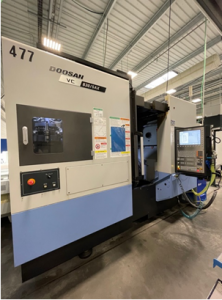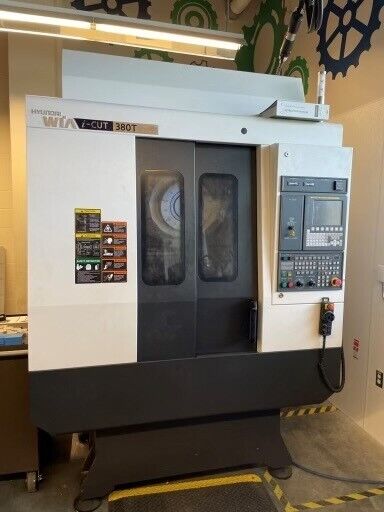
What Industry Experts Recommend Before Purchasing a Pre-Owned, Second-Hand, Surplus, Used HYUNDAI WIA i-CUT 380T CNC Tapping & Drilling Center made in South Korea
Here’s a refined “expert’s due-diligence” guide you can use (or adapt) when considering a used / surplus / secondhand Hyundai WIA i-CUT 380T (or variant) CNC Drilling & Tapping / Vertical Machining Center. Many of the recommendations come from practices used by machine tool dealers, refurbishment shops, precision manufacturing buyers, and machining experts. Use it as a checklist / framework when you go inspect in person (or ask the seller for proof).
Context & Key Characteristics of the i-CUT 380T Series
Before diving into inspection, it’s helpful to understand what you should expect from the i-CUT 380T family so you can spot inconsistencies or red flags.
Some relevant specs, features, and design notes:
- The i-CUT 380T series (and its “TD/TD i / TI / TDi” variants) is a compact high-speed vertical machining / tapping center with built-in drilling & tapping capability.
- It typically uses direct-drive / high-RPM spindle designs, capable of up to ~12,000 rpm (in many configurations).
- The machine often incorporates rigid tapping, a key feature.
- Its travels (for many units) are ~20.5″ in X, ~15″ in Y, ~13.8″ in Z.
- The standard tool magazine is 14 stations, with optional larger magazines or dual-arm styles.
- Some variants (TD / TDi) use dual tables (pallet-style indexing) so that while one side is machining, the other side can be loaded/unloaded.
- The axes are often guided using LM guides (linear motion / roller guides) for speed and responsiveness.
- Ball screws typically are double-nut (preloaded) to reduce backlash, and often coupled directly (no belts/gears) to servo motors to minimize components and backlash.
- The machine includes coolant, possibly through-spindle coolant, and has utility needs (power, coolant, chip handling, etc.).
Knowing all that sets your benchmark — if what you see deviates significantly, it may suggest repair, modification, or degradation.
What Experts Strongly Recommend Checking Before Purchase
I’ll break this down into phases and key areas, similar to how an experienced buyer or refurbisher would approach it.
| Phase | What to Inspect / Test | Why It’s Critical (Risks) | How to Test / Acceptable Behavior / Indicators |
|---|---|---|---|
| Pre-Inspection / Documentation / Seller Info | • Ask for serial number, build year, variant (T, TD, TI, TDi) • Request maintenance logs, repair history, parts replaced • Ask for hours / cycles (power-on, cut, tapping) • Request photos/videos: axes moving, spindle running, control boot • Ask what tooling, fixtures, probes, accessories come with it • Confirm machine utilities: power spec, coolant, air, chip removal, evacuation • Ask whether the machine has been relocated / reinstalled / moved, and by whom | These give early clues to condition, wear, hidden modifications, or mismatches between what’s claimed and what’s delivered. Relocation or poor reinstallation is a frequent source of alignment or leveling issues. | Check that the serial data matches the machine plate and internal IDs. Compare what seller claims vs what you later observe. If possible, ask for a “walk-around + motion video” before traveling. |
| Visual / Structural / Static Inspection | • Examine the base, column, machine frame, and casting surfaces for cracks, weld repairs, distortions, or signs of stress • Look for corrosion, pitting, coolant damage, or rust, especially in corners, under covers, inside coolant troughs • Inspect guard covers, way covers, bellows, and shields (are they intact, fitting, without gaps) • Inspect spindle nose and taper area for damage, burrs, or corrosion • Check machine leveling / foundation: whether the machine sits square, whether there is evidence of sag or shifter bolt movement • Inspect coolant tanks, plumbing, hoses, filters, pumps for leaks or corrosion • Open electrical cabinets (if allowed) and look for dust, chips, signs of overheating, wiring modifications, missing covers | Structural flaws, misalignment, or leaking fluids can fundamentally degrade performance and increase repair costs Damaged or missing way covers lead to chip ingress and faster wear Poor foundation or leveling will produce geometry errors under load | Use bright light and mirror or borescope. Photograph suspicious areas. Check the machine is not “rocking” or unlevel. Check continuity of covers and seals. |
| Motion / Dynamics (Jog / No-Load Tests) | • Power up (if permitted) and jog all axes slowly and fast, in both directions. Watch and feel for sticking zones, uneven motion, noise, or jerky behavior • Command small back-and-forth moves to detect backlash or lost motion • Repeat homing or reference return multiple times and measure consistency of return position • Move axes to travel limits to test limit switches or soft limits • Run spindle up from low to mid speeds; listen for bearings, vibration, or run-out • After the spindle runs, feel whether the spindle housing or nearby parts become unduly warm | Motion tests reveal binding, worn ballscrews, servo issues, backlash, guide damage, or motor / drive faults Homing repeatability is critical for precise tapping / drilling Spindle issues are costly to fix | Use a test indicator (if possible) on the spindle or tool holder to check run-out or drift. Note how much and where backlash shows. Jog multiple times to check repeatability. |
| Tool Change / ATC / Magazine / Tapping Mechanism | • Test the automatic tool changer (if equipped): run multiple tool-change cycles, check for misloads, hesitation, pocket alignment • Observe whether tool insertion / locking is complete, and that sensors detect tool presence correctly • For rigid tapping: command tapping operations (dry or on dummy) and check synchronization, torque behavior, and whether thread pitch integrity can be maintained • Check tap retract function, torque cutoff, and tap release in idle mode | Failures here reduce usability: poor ATC causes downtime, misloads, or tool crashes Rigid tapping is a key value component — poor performance kills usability in threaded-hole work | Use a short tap-run cycle; monitor whether threads turn out consistent and clean. Command tool changes and see if speed / movement are smooth. |
| Control, Electronics & Wiring | • Power up control and check boot sequence, error messages, alarm logs • Test control interface (buttons, soft keys, display, jog keys) • Browse parameter screens, offsets, compensation tables • Confirm the control model and version (Mitsubishi, Fanuc, Siemens, etc.) and whether spare parts are locally available • Inspect wiring, servo drives, I/O modules, amplifiers: look for burnt wires, discoloration, missing covers • Check routing of cables (shielded, separated from chips) | Even if mechanics are good, control failures or obsolescence often doom a used machine Poor wiring or overheated modules are precursors to failures | Ask for backup of parameters or program memory. Inspect PCBs for blown capacitors or discoloration. |
| Coolant, Lubrication & Auxiliary Systems | • Start coolant pump and inspect flow, pressure, cleanliness, leaks • Check coolant tank, filters, piping for sludge, corrosion, or poor condition • Verify lubrication (grease / oil) lines to axes and whether they function • Inspect chip handling / removal systems, conveyor trays, guards, drainage • For through-spindle coolant (if present), test pressure and sealing | Auxiliary systems often are neglected; failures here can disable core functions or reduce reliability Contaminated coolant or poor lubrication shorten lives of bearings, guides, screws | Run coolant at low / medium flows and inspect for steady flow. Check pressure (if gauge available). Inspect lubricant supply lines for blockage or leaks. |
| Test Cuts / Drilling / Tapping Under Load | • Bring your own representative workpiece / blank and perform drilling + tapping tests (if possible) • Measure the resulting holes / threads (pitch accuracy, concentricity, run-out, burrs) • Run multiple cycles and see if performance drifts • Vary depth, distance from center, and check consistency across the work envelope • Check thread strength, pitch consistency, and that the machine clears chips properly • Monitor for chatter, binding, torque peaks, or spindle load fluctuations | Many defects only appear under real load: misalignment, spindle deflection, thermal drift, chip evacuation issues | Use measuring tools (thread gauges, bore gauges, micrometers) to check the result. Run a repeated series of threaded-hole cycles and check for stability. |
| Geometric & Metrology Checks | • Check spindle run-out (radial / axial) with a test bar and dial indicator • Check alignment of axes (squareness, perpendicularity) between X, Y, Z • Check backlash / lost motion quantitatively • Check flatness of table surface, leveling of machine • After machine warms, repeat key measurements to detect drift • If dual-pallet or indexing table variant, check indexing accuracy and table locking firmness | These tests give you quantifiable error budgets you can compare to your required tolerances | Use calibrated measurement instruments (surface plates, test bars, indicators, squares) and repeat tests at different times (cold/hot) |
| Risk Assessment, Repair Estimate & Negotiation | • Compile all defects / deviations found, estimate costs for repairs, parts replacement, alignment, calibration • Check parts / modules support for Hyundai WIA i-CUT series in your region (especially drives, spindle parts, control modules) • Estimate how much refurbishment would be needed before the machine is reliably production-ready • Factor in rigging, transport, installation, leveling costs • Negotiate discount on the basis of defects found rather than a flat “used” decrement • Try to negotiate a trial or acceptance period or warranty coverage (especially for the spindle, drives, or ATC) | In practice, many used machines require injection of capital post-purchase. You want to understand that ahead of time | Build a “punch list” and attach cost estimates. Compare vendor refurb prices. Use your findings to push a fair discount or cushion. |
| Documentation & Transfer | • Ensure you receive all original manuals (including control, electrical, maintenance, parts list) • Verify machine’s serial plate / ID plate matches the documentation and internal references • Get electrical / wiring diagrams, parameter sheets, backup program files (if any) • Confirm all included accessories, tooling, gauges, probes are transferred • Make sure purchase / sale contract explicitly states “as-is / acceptance period / defects / warranty terms” | Without proper documentation, future service or repairs become much harder or more expensive | Cross-check serial numbers. Make a sign-off checklist with seller for all parts / accessories / documentation. |
Special Considerations / Red Flags for i-CUT / Tapping / Drilling Machines
Because your machine is not just a milling center but includes drilling & tapping, there are a few added points that experts often warn about:
- Rigidity & Spindle Torque
Tapping (especially in tougher materials) places torque and reverse-pull loads on the spindle and Z-axis. If the spindle bearings, spindle-nose taper, or Z-axis drive are worn, you might get twisting, mis-threading, or spiral drift. - Tap Release / Thread Synchronization
The control must properly synchronize feed and spindle rotation so that the tap advances and retracts cleanly, without “bottoming out” or over-stressing. Mis-configuration or wear here can break taps. Also ensure torque control, retract speeds, and neutral-release settings are correct (these are often hidden in parameter settings). - Chip Evacuation in Tapping / Deep Drilling
Chips must not clog the hole or cause tap breakage. If coolant pressure, chip flow, or through-spindle tool coolant is compromised, you’ll have failures in deep holes or blind tapping. - Tool-Changer & Tapping Cycle Integration
If the ATC or tool path sequences are slow or unreliable, threading cycles might be delayed or mismatched. Failures in changing a tap or mis-indexing cause scrapped parts or rework. - High-Speed and Dynamic Behavior
i-CUT series machines are designed to run high feed rates and rapid traverses (non-cutting moves). Poorly tuned axes, worn guides, or backlash can manifest especially in fast moves (jerks, vibration). - Dual-Pallet / Indexing Table Issues (if the variant has it)
If the machine is the TD / TDi version with a dual table, the table indexing mechanism, locking pins, hydraulic / mechanical indexing, and table flatness must be checked thoroughly. Poorly holding pallets or misaligned indexing can wreck precision. - Control / Software Support for Tapping Cycles
The control must support the proper tapping cycles (rigid tapping, return/retract control) and have parameters / macros enabled. In some older or custom retrofits, manufacturers may disable or delete these functions. - Wear from High-Speed Use
Because these machines operate at relatively high speeds for drilling and tapping, wear on guideways, screws, bearings tends to occur more aggressively than in purely milling machines. Look for signs of chronic wear or past refurbishment.