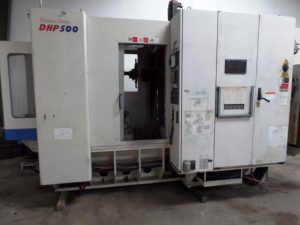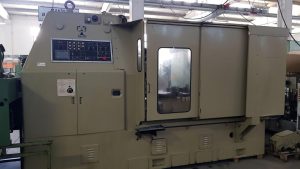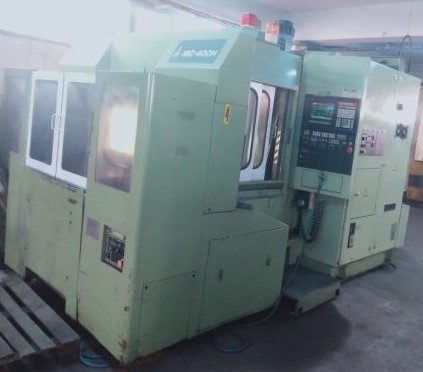
What Do Buyers Look for Before Investing in a Pre-Owned, Used, Secondhand, Surplus CNC Equipment Before Purchase Okuma MC-400H CNC Horizontal Machining Center made in Japan
When evaluating a pre-owned / used / surplus Okuma MC-400H (horizontal machining center)—or similar Okuma horizontal CNCs—for purchase, here is a structured checklist of what experienced buyers look for, with common failure modes, red flags, and decision criteria. I also include model-specific cautions based on what’s known of the Okuma MC-400H and comparable Okuma horizontals.
I. Acquire & Study the OEM / “As-New” Specification
Before visiting the machine, gather the original spec sheet (or as-close-as-possible) for an MC-400H (or the variant at hand). Use this as your benchmark to spot deviations or degradations.
Some of the published specifications for Okuma MC-400H (used listings) include:
- X travel: ~ 561.3 mm
- Y travel: ~ 459.7 mm
- Z travel: ~ 510 mm
- Table: ~ 401.3 × 401.3 mm, pallet / table load ~ 399.3 kg
- Spindle taper: #40
- Max spindle speed: ~ 7,000 rpm
- Tool pockets (ATC): ~ 30
These values set your expectations. When you inspect, compare the machine’s observed or measured performance against these.
Also, study the machine’s control variant (e.g. Okuma OSP-5020M or other) and what modules or options might have been installed originally.
II. External / Structural & Visual Inspection
Even before turning the machine on, many critical issues can be spotted visually. Do a meticulous walk-around.
What to inspect:
- Machine frame, base, and castings
- Look for cracks, welds, resurfacing, or evidence of impact damage
- Check for sagging, twist, or misalignment of the base
- Rust, pitting, corrosion—particularly in chip or coolant-drenched zones
- Signs of being “repaired” or patched in small zones (especially near heavy structures)
- Way covers, bellows, protective shrouds
- Are way covers intact (no tears, holes, misalignment)?
- Do guards/doors open/close freely without binding or rubbing?
- Inside covers: check for embedded chips, metal fragments, or contamination
- Table / pallet / fixture surfaces & interfaces
- Flatness, wear, surface damage, distortions
- Check clamping surfaces, dowel pin holes, face tolerances
- If there is a pallet changer or indexing system, inspect the mechanical parts, locking pins, guides
- Coolant, lubrication, hydraulic, pneumatic systems
- Look for leaks (coolant, oil, hydraulic fluid) at hoses, fittings, seals
- Check piping, hoses, reservoirs, filtration systems for cleanliness, integrity
- Inspect pumps, tanks, filters — are they well maintained?
- Foundation, leveling, anchoring
- Are leveling screws, pads, base supports intact and not excessively worn?
- Any evidence that the machine has shifted, been relocated poorly, or that the base is misaligned
- Residual shims, pad deformations, or unevenness
- Control cabinet, wiring, ventilation
- Dust accumulation, rust, moisture ingress in the control / electrical cabinet
- Cooling fans, filters, ventilation grills—are they clean and functioning?
- Wiring harnesses, cable routing, strain reliefs
If structural integrity is compromised, realignment or repair may be expensive, especially for a horizontal machine requiring precision.
III. Mechanical Motion, Kinematics & Wear Inspection
Once you have power or permission to jog the machine, examine how each axis behaves, how the mechanics respond, and whether there are hidden mechanical issues.
- Axis jogging & motion smoothness
- Jog each axis (X, Y, Z) slowly over full travel; feel for binding, friction changes, “sticky” zones
- Reverse direction and test for hysteresis (i.e. different feel/behavior in reverse vs forward)
- Listen for scraping, clicking, or other abnormal sounds during motion
- Backlash / lost motion assessment
- Using a dial indicator (or more precise measurement tool), test for backlash in every axis
- Reverse-direction tests (e.g., +X then –X) to quantify the dead band
- Acceptable backlash depends on required tolerances, but any excessive play is a red flag
- Straightness, pitch / yaw, cumulative error tests
- If possible, use a test bar or in-situ measurement to assess straightness over full travel
- Check squareness between axes (X vs Y), flatness deviations, and cumulative error on repeated traverses
- Watch for drift when traversing long distances
- Ballscrews, nuts, linear guideways / box slides
- Visually inspect ballscrew surfaces: pitting, scoring, “fretted” areas
- Check ball screw nuts — whether they have wear, play, or require re-preloading
- Inspect linear rails or guideways: signs of spalling, corrosion, chips, surface damage
- Move slides manually (if safe) and see whether the motion is uniform
- Spindle condition (bearing health, runout, vibration)
- Run the spindle unloaded at different speeds; listen for hum, growl, or vibrations
- Use test bar with dial indicator to measure radial and axial runout
- Run the spindle for a few minutes and monitor temperature, vibration trends
- Inspect spindle housing, seals, lubrication path for evidence of wear or leakage
- Gearboxes / transmission (if present)
- Some horizontal machines may use gearboxes for spindle or axis drive — inspect for noise, backlash, leaks, worn gears
- Jog slowly and listen for rattling or irregular sounds
- Tool changer, tool arm, magazine systems
- Operate the ATC (automatic tool changer) through full cycles — tool pick, place, change, rotation
- Inspect grippers, magazine racks, rails for wear, alignment, looseness
- Check retention force, seating accuracy, concentricity of tool holders
Mechanical defects like excessive backlash, wear in guideways, or spindle issues are among the most costly to repair and hardest to fully compensate for.
IV. Control, Electrical, Software & I/O Systems
A mechanically sound machine is worthless if its control or electronics fail or are outdated. For Okuma machines, control integrity and support is critical.
- Power-on, boot-up, control behavior
- Power on the CNC, check for error messages, alarms, or warnings
- Review error/fault logs, memory status, parameter backups
- Ensure soft limits, homing routines, offset tables, referencing work correctly
- Servo drives, amplifiers, motor cables
- Inspect power, signal, and encoder cable harnesses: look for damage, wear, heat discoloration
- Jog axes while monitoring amplifier / servo behavior (heating, current draw, noise)
- Check drive faults, overcurrent alarms, or anomalies during motion
- Sensors, limit switches, feedback devices, interlocks
- Test limit switches, home switches, safety interlocks, E-stops — ensure correct triggering and response
- Probe systems, tool-length sensors, coolant sensors — test them
- Inspect wiring, connectors, cable labeling, terminal blocks
- Power supply, grounding, filtering
- Check incoming voltage, phase stability, power conditioning, transformers
- Inspect cabinet grounding, shielding, noise suppression
- Ensure cabinet cooling, ventilation, filter maintenance
- Control software, version, upgrades / obsolescence
- Identify the CNC model (e.g. OSP-5020M or other)
- Determine whether software, patches, or upgrades are still supported
- Check whether critical modules (e.g. I/O boards, CPU boards, memory units) are in a supported lifecycle
- Coolant / lubrication control, filtration, pumps
- Verify coolant pumping, filtering, pressure, flow, temperature
- Check lubrication systems for axis ways, ball screws, spindle — is automatic lubrication functioning?
- Inspect filters, sumps, clean-out pipes
Okuma machines, like many precision CNCs, heavily rely on control diagnostics and electronics. Failures in drives, I/O, or control modules can be expensive or impossible to replace depending on age.
One reported issue: MC-400H machines may show an alarm 115 (“spindle lube motor is turned off”) — possibly indicating lubrication system or pump problems.
Also, over time, chip build-up under the table or under way covers in Okumas has been known to press on axes in certain designs, causing erratic behavior. In one forum thread, chip compaction in the Y-axis area was blamed for unexpected “bounce back” motion.
V. Accuracy, Repeatability & Test Cuts
At this stage, you must validate that the machine can actually produce parts within acceptable tolerances.
- Run a reference / calibration part
- Use a specimen or test workpiece with known dimensions
- Measure flatness, parallelism, straightness, circular features, positional tolerances
- Repetitive trials / cycle repeatability
- Run the same geometry multiple times, under varied conditions (different tool / location / direction)
- Look for drift, variance, or repeatability loss
- Thermal / warm-up behavior
- Let the machine run for 20–30 minutes or more; measure thermal drift or growth
- Monitor temperature of axes, spindle, housing
- See whether positional error changes over time
- Realistic “production cut” test
- If feasible and safe, perform a representative cut (milling, boring, drilling)
- Watch for chatter, deflection, variation, tool wear, consistency
- Evaluate chip control, coolant effectiveness, stability under load
If the machine cannot hit acceptable tolerance even in test, it’s a strong indicator that refurbishment will cost more than acquisition.
VI. Documentation, Maintenance History, and Past Modifications
A used machine with a good documentation trail and known maintenance is far less risky.
- Maintenance logs (lubrication, cleaning, repair, replacement)
- Spindle hours or total run-time
- Overhaul or refurbishment records (bearing replacement, major rebuilds)
- Original manuals: mechanical, electrical, control, I/O
- Wiring diagrams, schematics, ladder logic, I/O tables
- Parameter backups, software versions, control module IDs
- Records of upgrades, retrofits, or non-OEM parts
Absence of documentation is a red flag, especially for horizontal machines where alignment, calibration history, and previous repairs matter a lot.
VII. Spare Parts, Support & Obsolescence Risk
Even if a machine is mechanically solid, its long-term viability depends on supportability.
- Parts availability
- Are critical spares (spindle bearings, servo drives, motor modules, encoders) still manufactured or available as reman?
- Are there alternate or third-party sources?
- OEM / service support
- Does Okuma or an authorized service have support for the MC-400H / control variant in your region?
- Are there local service technicians familiar with Okuma horizontals?
- Is retrofitting or upgrading parts feasible if something fails?
- Control module / electronics obsolescence
- Ensure that the control cards, memory units, PLC / I/O modules are not end-of-life or rare
- If a control module fails, can a compatible replacement be sourced?
- Upgrade paths
- Can the machine’s control be modernized if needed?
- Can you add newer options (e.g. additional axes, probing, better spindle, automation) in the future?
Without reliable parts or support, even a “good” used machine can turn into a stranded asset.
VIII. Commercial / Risk / Negotiation Strategy
After compiling objective data, convert it into a commercial decision matrix.
- Estimate cost of probable repairs / refurbishment (bearings, guides, control modules)
- Add contingency (e.g. 10–20 %) for unknowns
- Insist on final acceptance tests or performance guarantee (i.e. pay remainder only after meeting criteria)
- Ask for a “run-in / acceptance period” if possible
- Include transport, installation, leveling, alignment, commissioning, calibration in your cost model
- Consider downtime, operator retraining, shakedown time
- Evaluate resale or salvage value
If the seller is unwilling to allow live tests or provide documentation, that’s a red flag.
IX. Model-Specific / Okuma MC-400H Particulars & Known Issues
Because horizontal machines and Okumas have their own quirks, here are things especially worth watching for in an MC-400H:
- Chip accumulation / under-table chip build-up
- In Okuma machines, chips accumulating under the table or under covers have caused axis loading or binding issues.
- Check the chip removal path, sloping covers, drainage, and cleanliness
- Spindle lubrication / pump issues
- Alarm 115 (spindle lube motor turned off) is reported in MC-400H usage contexts — this suggests the spindle lubrication pump or system has had issues.
- Make sure spindle lube / cooling system is fully functional and monitored
- Control / software obsolescence
- Many used MC-400H machines are older units with older Okuma control versions (e.g. OSP-5020M)
- Check whether the control is fully supported, and whether spare cards or memory units still exist
- Pallet / table / clamping system wear
- The indexing, locking, clamping surfaces may be worn; make sure the mechanical coupling is tight and accurate
- Misalignment or wear here can magnify errors
- Thermal stability & warm-up performance
- Okuma machines often emphasize their “Thermo-Friendly” concepts in newer machines; older units may not be as thermally robust
- Watch for dimensional drift as thermal loads arise
- Hydraulic or pneumatic subsystems
- Some table clamping or pallet systems use hydraulics or pneumatics — check cylinder seals, lines, valves, leaks
- Past modifications / misuse
- Check whether the machine was operated beyond its spec (heavy cuts, improper cooling, poor environments)
- Look for non-OEM parts or modifications that may have compromised integrity