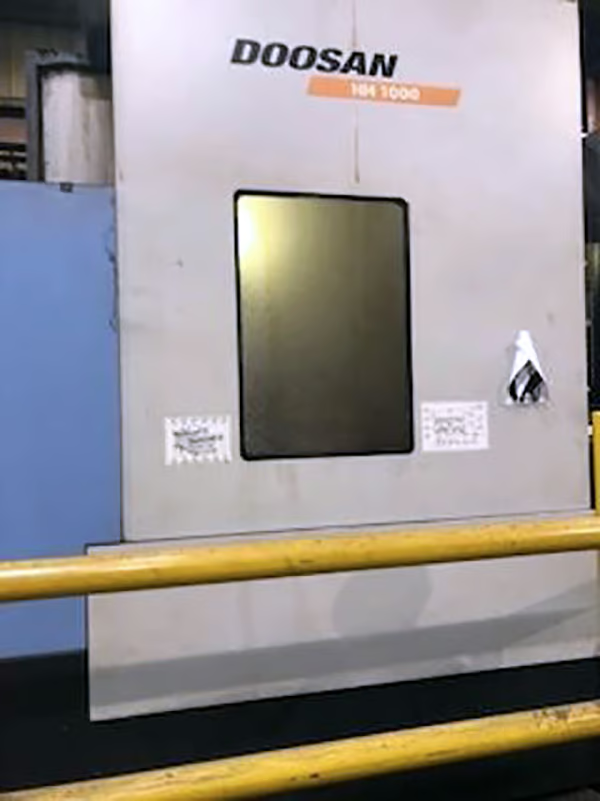
What Do Buyers Look for Before Investing in a Pre-Owned, Used, Secondhand, Surplus CNC Equipment Before Purchase Doosan HM-1000 CNC Horizontal Machining Center made in South Korea
Here’s a tailored “what buyers look for” checklist and methodology—adapted for a Doosan (DN Solutions) HM-1000 (or equivalent heavy horizontal CNC) — plus key red flags and advice. Use this as your due diligence in evaluating a used / surplus HM-1000 before purchase.
I. Know the Benchmark / OEM Specs First
Before your inspection, assemble the official (or high-end) spec sheet of the HM-1000 (or the particular variant you’re evaluating). This gives you a reference to compare against what you observe.
Typical HM-1000 / HM Series Specs (to know)
From catalog and vendor sources:
| Parameter | Typical Value / Range* |
|---|---|
| X / Y / Z Travels | ~ 2100 / 1250 / 1250 mm (82.7″ / 49.2″ / 49.2″) |
| Max Spindle Speed | 6,000 rpm (standard) |
| Spindle Motor / Power | ~ 26 kW (some catalogues) |
| Spindle Torque | ~ 1,989 N·m (catalog spec) |
| Table / Pallet Size & Load | Pallet ~ 1000 × 1000 mm (often standard) load ~ 3,000 kg typical |
| Rapid Traverse Rates (X / Y / Z) | ~ 24 m/min each axis (≈ 944 ipm) |
| Tool Magazine / ATC | Often 60 tools (or up to higher counts in some versions) |
| Construction / Guideways | Box guideways on all axes, robust heavy cast structure, forced spindle cooling, shuttle-type/pallet changing systems |
* These are “catalog / ideal” values; a used machine will often show degraded performance. Your job is to see how far from spec it has drifted, and whether the drift is repairable.
By having those numbers in hand (tripsheet, printout, or in your tablet), you’ll be ready to spot divergences.
II. Visual / Structural / External Condition Checks
Much of what kills a used machine is structural damage, hidden wear, or environmental abuse. These items are low-cost to check but can reveal fatal defects early.
- Frame, base, casting integrity
- Look for cracks, cold repairs or re-welds, especially near heavy load zones, corners, column joints
- Check for distortion / sag in the base. Use straight edges or feel for twist
- Rust, pitting, or corrosion on machine surfaces—especially in coolant spray or chip zones
- Evidence of past impacts (e.g. forklift, crane mishandling) or misalignment
- Way covers, bellows, guards
- Check for tears, holes, patching, misalignment, or interference
- Move covers / guards manually to see if they bind or scrape
- Check inside covers for debris or chips (leftover from prior use)
- Pallet changer, fixture interfaces, clamping surfaces
- Inspect pallet surfaces for wear, damage, indexing surfaces
- Check that clamping surfaces (e.g. pallet face, fixturing pins) are flat, undistorted
- Inspect pallet change mechanism for smooth motion (jog it)
- Coolant, lubrication, hydraulic systems externals
- Look for leaks: coolant, oil, hydraulic oil lines, fittings, seals
- Rust stains, scaling, or residue build-up around piping
- Check lines, hoses, pumps, reservoirs — are they clean and well maintained?
- Foundation, leveling, anchoring
- Are leveling screws / pads intact? Are there signs of overloading or pad crushing?
- Are there shim patterns or indentations under the machine (indicative of movement or settling)
- If the machine has been moved, has the base been re-leveled properly?
If the structural skeleton is compromised, no amount of recalibration or reconditioning can fully restore long-term integrity.
III. Kinematics, Motion & Mechanical Condition
This is where you see if the machine still moves accurately and cleanly. It’s often the trickiest, because internal wear or play can hide until you push it.
- Axis jogging & smoothness
- Jog each linear axis (X, Y, Z) slowly and across the full travel. Listen/feel for binding, friction changes, stick-slip zones
- Watch for audible “clicks,” changes in smoothness or resistance
- Reverse direction and check for hysteresis (difference in return path)
- Backlash / Woltring / Deadband checks
- Use a dial indicator (or a laser interferometer, if you have) to measure the backlash in each axis
- Measure lost motion (e.g. move +X, then –X, see how much the backlash is)
- Compare the measured backlash to what the machine’s spec or acceptable tolerance should be
- Straightness, squareness, pitch error, cumulative error
- If possible, use a long test bar or in-situ measurement to check straightness over full travel
- Check squareness between axes (e.g. is the Y axis perfectly orthogonal to X?)
- On long motions, check for drift or accumulation of error (e.g. cumulative build-up over repeated zig-zag moves)
- Ballscrews, linear guides / box guideways
- Inspect ballscrew surfaces for pitting, scoring, “fretting,” or polished zones
- Check nut behavior (if pre-loads exist); see whether there is play or backlash in nuts
- Inspect linear guide or box guideway surfaces for chips, wear, corrosion, or damage
- Feel for “bumps” or irregularities when sliding manually (if possible)
- Spindle condition
- Run the spindle (unloaded) at various speeds; listen for bearing hum, growl, noise changes
- Use test bar and dial indicator to measure radial and axial runout
- Run the spindle under light load and monitor vibration or temperature
- Inspect spindle housing, bearing seals, lubrication system (oil cooling, oil supply)
- Gearboxes / torque transmission (if any)
- Some HM series machines use gearboxes in their spindle drive or axis drives — check for backlash, noise, oil leaks
- Jog at slow speeds and listen for gear rattle or irregular sound
- ATC / tool magazine system
- Execute a tool change cycle (pick / drop) and observe for misalignment, hang-ups, collisions
- Inspect magazine rails, grippers, arm joints — look for wear, looseness, scraping
- Check retention force / drawbar actuation, tool seating, and interface fit
Any axis with excessive backlash, binding, play, or uneven motion is a serious concern — sometimes repair is possible, sometimes not economically so.
IV. Electrical, Control & Software Systems
A mechanically sound machine without a fully functioning control system is useless. This layer is often where surprises lie.
- Control system & interface health
- Power on the CNC; confirm start-up, boot behavior, error logs
- Inspect for hardware faults, alarms, or warnings
- Verify soft limits, homing routines, referencing operations
- Check program upload / download functionality (USB, Ethernet, serial)
- Inspect the existence & integrity of backups, configuration files, parameter sets
- Servo drives, amplifiers, motor cabling
- Check wiring harnesses, connectors, shielding, strain reliefs
- Power up motors, jog axes, monitor for irregular heating, humming or noise
- Watch for drive faults or overcurrent alarms upon motion
- Limit switches, sensors, interlocks, I/O systems
- Manually trigger limit switches, safety doors, E-stops, interlocks — ensure correct response
- Test probes, tool break sensors, coolant level sensors, etc.
- Inspect I/O wiring harnesses, terminal blocks, connectors, cable labels
- Verify that manuals / wiring diagrams / ladder diagrams are available
- Power supply, grounding, environmental subsystems
- Check incoming power / voltage / phases are correct and stable
- Check transformers, power filters, UPS systems (if any)
- Inspect cooling fans, air filters, ventilation systems
- Check auxiliary subsystems (coolant pumps, hydraulic / pneumatic units, chip conveyors) for correct operation
- Homing / calibration / compensation routines
- Run full homing routines and check repeatability
- Check parameter offsets, tool length compensation, spindle orientation / indexing
- See whether any advanced compensation / error mapping is installed (and whether it’s intact)
Without a healthy, responsive, well-documented control system, post-sale repair or troubleshooting becomes expensive and slow.
V. Accuracy / Test Cuts / Proven Performance
This is your “proof in the pudding” phase — you want the machine to demonstrably produce usable parts.
- Produce a test piece or calibration part
- Use a certified or known reference part with geometric features (flatness, perpendicularity, hole circles, position tolerances)
- Measure the tolerances and compare with your own required tolerances
- Full-travel / cumulative motion tests
- Move an axis over its full stroke repeatedly (back and forth) and check for drift, repeatability loss, slippage
- Check if the error accumulates or “walks” over many cycles
- Thermal / warm-up behavior
- Run the spindle and relevant axes for 10–30 minutes (or longer) to allow thermal equilibrium
- Measure drift, thermal growth, and stability
- Monitor temperature of axes, bearings, housings
- Dynamic / cutting tests
- If possible, place a mild-to-moderate load cut (not heavy roughing, but a representative cut)
- Monitor for vibration, chatter, deviations, stability under load
- Listen and watch carefully for signs of contact in guideways, abnormal noise
If it can’t reliably produce your test part (or meet your required tolerances) under test conditions, then it may require expensive repairs or be unsuitable for your application.
VI. Documentation, Service History & Past Upgrades
A healthy service history and thorough documentation dramatically increase the machine’s value and reduce risk. What buyers should demand:
- Maintenance logs (lubrication, repairs, replacements)
- Spindle hours or run time records (if available)
- Repair / overhaul records (bearing changes, major swaps)
- Original / as-built manuals (electrical, mechanical, control)
- Wiring schematics, ladder diagrams, I/O documentation
- Software / parameter backups, control card / module IDs
- Parts lists and exploded views
- Records of retrofits, upgrades, modifications
Gaps in documentation add risk: unknown modifications or hidden faults may be lurking.
VII. Spare Parts, Supportability & Obsolescence Risk
A great machine is only as good as your ability to support it over its remaining lifetime.
- Parts availability
- Are critical parts (spindle bearings, servo modules, drives, control boards) still manufactured or offered as reman?
- Are there aftermarket suppliers or third-party equivalents?
- Check whether proprietary parts exist that are no longer sold
- Service / technical support
- Does the manufacturer or an authorized agent still support HM series / the control type?
- Are there local service companies with experience on that model?
- Can you get diagnostic support, parts replacement, or field service if needed?
- Upgradability / retrofit potential
- Can you upgrade the CNC control (e.g. a newer generation) or retrofit newer modules?
- Is it feasible to add options you need (spindle cooling, probing systems, enclosure improvements) in the future?
- Obsolete modules / risk
- Ensure that control electronics, firmware keys, or proprietary modules are not end-of-life or scarce
- If certain modules are no longer made, that’s a red flag
If you cannot maintain or service the machine later, your “cheap” purchase becomes expensive downtime.
VIII. Commercial / Financial & Risk Considerations
As you accumulate inspection data, translate them into business risk and negotiate accordingly.
- Estimate likely refurbishment / repair costs (bearing replacements, guide refurb, control repairs)
- Add contingency (often 10–25 %) for “unknown / hidden issues”
- Insist on test / acceptance clause in purchase contract (e.g. pay the balance after proving performance)
- Seek condition-based warranty (if seller is willing)
- Include transportation, installation, leveling, alignment, commissioning in your cost model
- Account for downtime, ramp-up, calibration, operator training
- Consider residual / resale value — how attractive is the machine to future buyers if you resell
IX. HM-1000 Specific Weak Points / Watch Items
When inspecting an HM-1000 (or variant) specifically, keep in mind these model-specific caution zones:
- Spindle & high torque gearbox wear — because HM series often use gear-driven spindle or torque-intensive design, spindle wear and gearbox condition are critical.
- Pallet / shuttle changer and indexing surfaces — frequent use over time can wear indexing locators, pallet faces, and clamping surfaces
- Guideways under heavy load / chip damage — heavy horizontal cutting can lead to more aggressive wear especially on Y/Z axes
- Heat / thermal management — these large machines generate heat; cooling systems, oil temperature control, and thermal stability are critical
- Control generation / module obsolescence — many HM machines come with Fanuc 31i / series controls; check whether that control version is still serviceable and whether spare modules are available
- Hydraulic / pneumatic actuation for pallet locking or clamping — these systems often degrade over time; check valves, seals, cylinders for leaks or slow response
- Large mass & alignment shift — because of the size and weight, any prior relocation may have introduced misalignment or residual stress in the frame