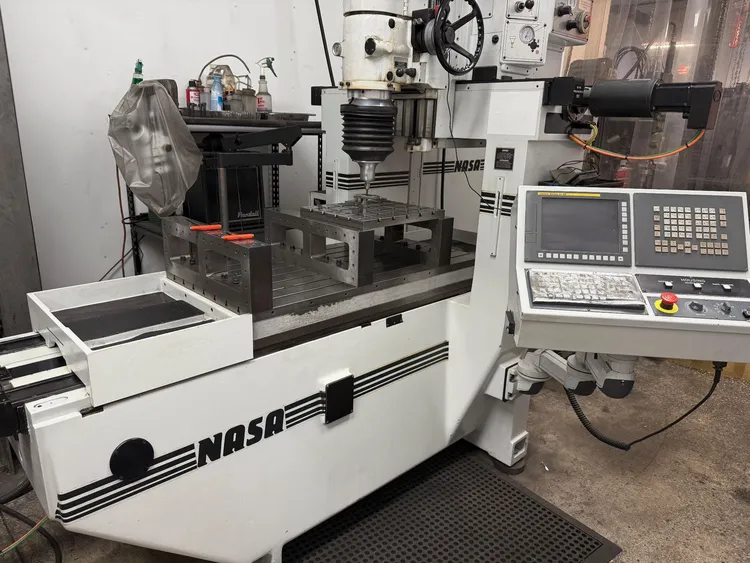
Technical Evaluation Guide: How to Identify a Quality Used, Secondhand, Pre-Owned, Surplus NASA-MOORE AGS-3-G48 CNC Jig Coordinated Hole Grinder with 5-Axis Control made in USA
Know the baseline & intended performance
Before inspection, get familiar with what the AGS-3 / Moore/NASA 5-axis jig grinder is supposed to deliver. Some relevant data:
- The “AGS-3-G48” variant is commonly cited with a 24 × 48 inch table and 5-axis CNC (X, Y, C rotation, U outfeed, and possibly a rotary axis) as a higher-capacity version.
- A used listing shows: 24″ × 48″ table, 360° C axis, vertical travel ~13″, quill (spindle travel) ~5″, rapid traverse ~40 IPM, contouring ~15 IPM, under Fanuc 0i-MF control.
- NASA/Moore conversions often advertise .000010″ (0.25 µm) resolution, positioning accuracy across full travel of ~.000080″, contouring accuracy ~.000120″ (when properly calibrated).
- The NASA “in the field” retrofit spec sheet mentions:
• X travel ~17.5″, Y ~10.5″ (for Moore No. 3 base conversion)
• Closed-loop DC servos with rotary encoders on ball screws
• Precision roller bearing way system, automatic “C” axis normalization, programmable chop grind on/off, lubrication systems, etc. - NASA’s marketing claims use of “ultra precision ball screws”, roller bearing ways, compensation, and guarantee of accuracies.
Interpretation / caution: Many AGS-3-G48 units may be retrofits or conversions (i.e. original Moore machines upgraded by NASA). Always ask about the history: whether it was newly built as AGS-3, or converted from an older Moore jig grinder. Upgrades and conversions can be done well, but they also introduce risk (alignment, integration, aging of original parts, etc.).
With that baseline in mind, here’s your inspection checklist.
1. Documentation, history & pre-inspection checks
These are tasks you should do before you even step into the machine room.
| Item | Why it matters | What to request / verify |
|---|---|---|
| Maintenance / rebuild records | A fully rebuilt or well maintained machine is less risky than one with unknown or undocumented history | Ask for service logs, rebuild dates, component replacements (e.g. spindle, bearings, screws, encoders, ways) |
| Conversion / retrofit history | Because many Moore jig grinders are retrofitted to CNC by NASA (or others), you must know which parts are original and which are modified | Ask: Was this machine factory-built as AGS-3-G48, or was it an older Moore grinder converted? Obtain modification drawings, alignment reports, conversion invoices |
| Total runtime & cutting hours | Wear is correlated with actual grinding hours | Ask for total powered hours, cutting hours (i.e. time under load), idle vs operational hours |
| Operating environment & materials | The kinds of materials ground, coolant used, chip environment, dust, vibration – all contribute to wear | Ask: what alloys or tool steels, abrasive materials, coolant type, chip removal methods, whether shop was humidity/dust controlled |
| Included tooling, accessories, spares | High-precision machines are only as good as their tooling and support | Get a list/inventory: grinding wheels, wheel dressers, collets, probes, fixtures, spare bearings, couplings, control backups, alignment tools |
| Original drawings, schematics, calibration reports | These are critical for future servicing, calibration, and troubleshooting | Ask for mechanical, electrical, control, hydraulic / pneumatic schematics, alignment or geometric calibration certificates |
If possible, include a clause in your purchase offer that gives you “final acceptance” after in-situ functional tests.
2. Visual & structural inspection
Examine the machine carefully for signs of abuse, wear, or structural issues.
Frame / structure / external
- Welds, cracks, repair patches
Carefully inspect the base, columns, bridges, saddle for signs of weld repairs or patches. Grinding machines must resist distortion; any structural rework near guide surfaces or mounting surfaces is suspect. - Rust, corrosion, pitting
On exposed surfaces, especially around ways, table edges, underneath enclosures, etc. Surface rust can often be cleaned, but pitting near sliding surfaces is dangerous. - Enclosures, doors, guards
Check that doors, shields, windows close properly, interlocks (if present) function, covers are intact. Missing shields may suggest prior collisions or removal for workaround fixes. - Chip / coolant residue, cleanliness
A machine caked with chips, slurry, dried coolant is a red flag for poor maintenance. Especially check inside covers, enclosures, under the table, beneath the saddle. - Leveling / foundation / base stability
If the machine is installed, inspect leveling blocks, grout, base support. Signs of shifting, movement, or damaged leveling can cause geometric errors.
Table, work surfaces, fixturing interface
- Table run-flatness & flatness
Using a granite reference or straightedge + dial indicator, check the flatness and twist of the 24×48 table. Deviation should be minimal (preferably within a few microns over short spans). - T-slot wear, clamping surfaces
Inspect the T-slots, clamping surfaces, fixture mounting surfaces for wear, rounding or damage. - Mounting surface geometry
Any damage or distortion to where fixtures attach will degrade the accuracy of ground holes.
3. Kinematics & motion systems (axes, guideways, screws)
This is the heart of precision. If the axes, screws, and guides are worn, the machine cannot perform to spec.
Guideways / slides / rails
- Visual inspection
Look for wear, scoring, rust, pitting on linear ways or roller/roller bearings. For a converted machine, check condition of original way surfaces and any retrofitted way systems. - Manual move and feel
With the power off, move each axis slowly by hand (if possible) or jog at slow speed. Feel for stick-slip, binding, nonuniform resistance, “dead zones” or zones of jerkiness. - Backlash / play measurement
Use dial indicators to check backlash on each axis (X, Y, C, U, and any rotary). Even small amounts of backlash are more costly in jig grinding than in milling. - Straightness, flatness, deviation along travel
Use a calibrated test bar, laser system, or ball bar / autocollimator to check straightness or deviation over the full travel of each axis. - Preload or clearance settings
If any axes have adjustable preload or clearance in bearings, verify they are within spec and properly set.
Ball screws / drive screws
- Axial end play / nut looseness
Lock the carriage and push/pull the screw to detect axial play. Any looseness in nut bearings or couplings is a red flag. - Torque uniformity test
Jog the axis at low feed and feel (or measure) if there is variation in torque (drag, binding, uneven resistance) along travel. - Thread wear, damage, corrosion
Inspect the screw shaft for wear marks, pitting, corrosion, or damage, especially near supports or couplings. - Lubrication system
Check that the screw-nut interface lubrication is functional: clean delivery lines, no blockages, oil or grease in good condition.
Motors, encoders, couplings
- Servo / drive motors
Inspect motor housings, connectors, heat discoloration, vibration when running, signs of overheating. - Couplings
Check for play, wear, looseness or misalignment in coupling between motor and screw or drive system. - Encoders / feedback systems
Cycle axes; verify encoder feedback is stable, consistent, and that the control sees consistent position feedback without noise or jitter. - Limit / home sensors
Exercise the axes to home / limit positions; ensure switches reliably trigger, no false trips or failures.
4. Spindle, grinding head & tooling interface
The spindle/quill/grinding head is the most critical subsystem in a jig grinder — high precision, high stress, and expensive to repair.
- No-load spindle run (vertical / rotational test)
Run the spindle (or grinding head) over its range of speeds (if variable). Listen and feel for abnormal vibration, hum, resonance, or bearing noise. - Runout / radial / axial error tests
Use a high-precision test bar or indicator to measure radial and axial runout at multiple radii. Any deviation beyond a few microns is suspect. - Bearing noise / condition
Use a stethoscope or vibration probe while running at moderate speeds to detect rumble, grinding, or abnormal resonance (especially at higher rpm). - Thermal drift / expansion
After a warm-up or grinding under load, measure how much the spindle centerline or quill drifts. Verify if the machine has or uses any thermal compensation mechanics or software. - Grinding head / wheel spindle interface
Inspect the collet / taper interface (e.g. wheel spindle taper) for wear, fretting, pitting, or damage. Poor taper integrity destroys concentricity at high speeds. - Draw-in / clamping / head locking / morphology features
If the machine uses a “chop grind” or intermittent mode (common in jig grinders) or head retraction, verify that the mechanisms operate cleanly, without lag or slack. - Wheel guards, spindle covers, coolant (if any)
Check guards, shrouds, or coolant nozzles around the head, for wear, leaks, or damage. - Vibration analysis, if available
If you can attach a vibration sensor and capture frequency spectrum, check for harmonics, bearing vibration peaks, or imbalance signatures.
—
5. Control system, electronics, software, diagnostics
A precision jig grinder is only as good as its control and feedback systems. Failures or instability here are often deal-killers.
- Power-up & control boot
Turn on the machine and verify that the CNC control initializes without errors, lights, alarms, or faults. The UI, display, keypad, indicators should all operate. - Axis motion via control
Use the control to command each axis (jog, move, interpolation) and verify that the response is smooth, accurate, free of lag or jerks. - Program load / execution / G-code test
Load a simple test program, including some hole grinding operations, contouring moves, tool change macros, etc. Observe whether the machine executes as expected. - Alarm / error log inspection
Check the control’s stored alarm or fault history. Frequent or unresolved errors may point to chronic issues. - Backup / program memory / file integrity
Confirm that all stored programs, parameters, offsets, and calibrations are present, non-corrupt, and retrievable. Ask to see backups, memory cards, or archives. - Probing / measurement / auxiliary sensors
If the machine is fitted with probes, touch systems, compensation sensors, or measurement aids, test their functionality (probe cycle, calibration, repeatability). - Cabinet wiring, connectors, cable carriers
Open control cabinets and inspect wiring for burnt insulation, discoloration, loose connectors, water ingress, solder rework, or wire fatigue. Also inspect cable carriers, retracting loops, harnesses, and shielding. - Cooling / ventilation in electronics cabinet
Ensure fans, heat exchangers, filters, vents are functional, clean, and properly cooling the electronics. Overheating is a common root cause of control failures. - Power quality & feeds
If possible, measure the incoming supply (voltage stability, phase balance, ripple, noise). Bad power can degrade servo/control electronics over time.
—
6. Auxiliary systems & support subsystems
Don’t overlook these supporting systems, because breakdowns here are common and can compromise machine functionality.
- Lubrication / centralized oil systems
The axes, ball screws, ways, and spindle bearings often depend on automated lubrication. Check pump function, oil quality, filters, lines, no leaks, and that sensors (low level) work. - Pneumatic / air supply (if needed)
Some grinding heads or mechanisms may use air or pneumatic systems (air motors, pressure for head retraction, etc.). Check lines, air quality, regulators, dryers, moisture, leaks. - Coolant / washdown / filtration (if applicable)
If the machine uses coolant or flood wash, inspect tanks, pumps, piping, filters, valves, hoses, leaks, and cleanliness. - Chip / swarf removal & guards
Check for chip guards, chip building or accumulation zones, conveyors (if any), and whether chips are properly evacuated. - Emergency stops, interlocks, safety devices
Test all E-stops, safety doors, interlock switches, protective covers, limit switches, and verify they are functional and reliable. - Auxiliary fixtures / tooling supports
If the machine came with fixtures, collets, dressers, spare parts, tool sets, or calibration tools, inspect their condition and compatibility.
—
7. Geometric, alignment & metrology checks
This phase is where you test whether the machine can actually meet the tight tolerances expected of a jig grinder.
- Machine leveling & stability
Verify the machine is level and stable in its installed position. A mis-leveled machine will distort under load. - Squareness / orthogonality
Use gauges, angle blocks, or precision tools to check that the axes (X–Y, Y–C, X–C) are orthogonal within tight limits. - Tramming / spindle perpendicularity to table
Use tramming tests (e.g. indicators, test bars) to verify that the spindle axis is perpendicular relative to the table surface. - Linear error / straightness over travel
Use a calibration bar, laser interferometer, or other high-accuracy measuring system to test the linear deviation or straightness of axes across full travel. - Volumetric / combined error / circular interpolation tests
Perform circular interpolation or volumetric error tests to see how well the machine holds in 3D paths (e.g. using a ball bar, or a laser 5D measurement). This reveals combined errors of axes, spindle, and control. - Repeatability / repositioning test
Command the same point repeatedly (move away, return) and measure deviation (ideally in the sub-micron range). This tests backlash, hysteresis, control repeatability. - Test grind a calibration piece / benchmark hole
If the seller allows, grind a reference workpiece or a test hole under controlled parameters. Measure features like diameter, circularity, concentricity, taper, surface finish. Compare to the machine’s claimed tolerances (e.g. few tenths of microns). - Thermal drift test
Let the machine run under load for a period, then re-measure key features to detect drift or thermal distortion.
—
8. Risk factors, acceptable thresholds & negotiation guidelines
After you complete your inspections, classify issues and decide whether to proceed, walk away, or negotiate.
Red-flag / deal-breaker issues
- Spindle with unrepairable or excessive runout, vibration, or bearing damage
- Structural damage, cracks or warp in base, column, or critical frames
- Control or electronics failure, missing or damaged control hardware, unrepairable CNC
- Major axes with uncorrectable wear, backlash, binding, or damage
- Missing or incompatible components, no documentation, or no means to service or rebuild
High-risk but possibly repairable defects
- Excessive backlash or wear in ball screws or nut assemblies
- Wear or scoring on guideways or rails
- Degraded lubrication systems (pump failures, leaks, contamination)
- Minor misalignment or drift that can be corrected by adjustment/calibration
- Missing or degraded accessories, but core system intact
Acceptable (manageable) issues
- Cosmetic wear, surface rust that can be refinished
- Minor control software or interface tweaks
- Missing tooling (if not critical)
- Recalibration or alignment needed
Offer & negotiation strategies
- Adjust offer to include cost of refurbishment, spare parts, alignment, calibration, and re-verification
- Include clause for “final acceptance / test grind performance in your facility”
- Ask seller to guarantee critical tolerances (runout, positioning, repeatability) in writing
- Use your findings (e.g. measured backlash, runout) as negotiation leverage
- Check availability of spare parts and support (especially for the control, drives, spindle, encoders)