24/10/2025
From Inspection to Installation: What to Verify Before Buying a Pre-Owned, Used, Secondhand, Surplus Bystronic BySprint Fiber 8020 CNC Laser 6 kW
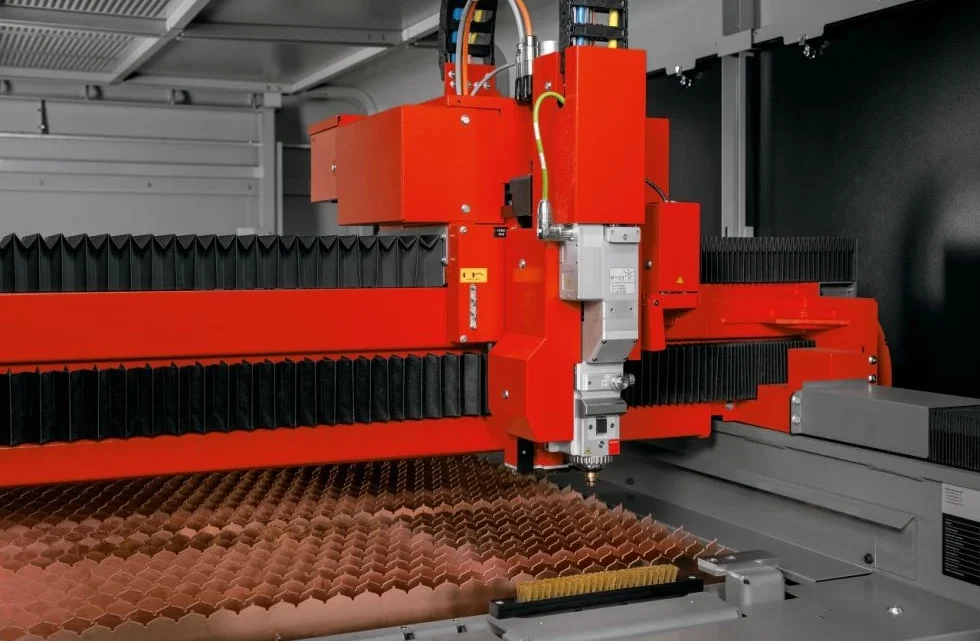
If you’re looking to purchase a pre-owned or surplus **Bystronic BySprint Fiber 8020 6 kW CNC fiber-laser cutting machine, here’s a detailed guide covering from inspection through installation — what to verify, what to ask, and what to budget for. It’s based on manufacturer guidance for fiber-laser systems
🔍 Pre-Purchase Inspection Checklist
1. Verifying Machine Identity and History
- Confirm model and configuration: For the “8020” version it typically means ~ 8 000 mm x 2 000 mm sheet area for the BySprint series.
- Ask for the laser source specification (e.g., 6 kW fiber laser) and confirm hours on the laser source and machine. A listing mentioned 6 kW with ~22 000 laser-hours.
- Obtain the service and maintenance log: how many shifts used, what materials were cut (steel, stainless, aluminium, etc.), any major repairs or collisions.
- Check if the machine has been relocated, modified, or had major retrofit (gantry, table, automation) — relocation may affect alignment.
2. Visual & Functional Condition
- Walk-around inspection: Look for signs of heavy wear, damage to guides, rails, gantry, covers, wiring and connectors. The environment (shop cleanliness, dust) gives a clue about maintenance culture.
- Inspect the optics path: Nozzle wear, lens condition, mirrors, cleanliness of protective glass. Bystronic says “cutting nozzle type and size should be correct, no damage; protective lenses clean, no fog or residue.”
- Check the cutting head: automatic focusing, collision history, sensor health.
- Examine the table bed and slats: are the slats worn or welded, is there excessive warpage, are the sheet supports in good shape.
- Verify motion systems: check for smooth movement of X/Y axes, measure backlash or looseness, listen for abnormal noise in motion drives or pulleys. Typical checklist for used machines applies: the 14 key points of inspection.
- Inspect supporting systems: cooling/chiller, exhaust, gas supply (oxygen/nitrogen/compressed air), fume extraction. Check for leaks, missing components, record of filter changes.
- Control system: confirm the CNC control (ByVision or equivalent), user interface, software version, availability of licenses and backups.
- Automation (if any): if the system includes loading/unloading or palletization, verify those systems work, check their condition and spare parts availability.
- Safety and compliance: emergency stops, guards, interlocks, CE-marking (if relevant), documentation/manuals.
3. Cutting Performance Verification
- Request test cuts: ideally on your material type or equivalent. Check cut quality, tolerances, edge condition, speed vs spec.
- Ask for parameters: cutting height, focus position, gas pressures, nozzle type/diameter (Bystronic says nozzle diameter ~1.0 mm recommended for optical centre detection).
- Check alignment/accuracy: e.g., 0.1 mm repeatability or whatever spec is given for the 8020 model (Bystronic spec sheet shows ±0.1 mm for BySprint 8020).
- Ask about consumables: costs for nozzles, lenses, focus optics; if these have been recently replaced or are worn.
- Check support for non-ferrous materials if you’ll cut aluminium, copper or brass (fiber lasers handle these but lens/nozzle wear can be higher).
4. Ownership & Operating Cost History
- Energy consumption: fiber lasers are efficient but you should check how much power the machine draws, chiller usage, etc.
- Gas usage: verify types of assist/cutting gases used and pressures required (e.g., nitrogen costs can be high).
- Spare parts/consumables usage: Nozzle change frequency, lens/coating replacement, slat replacement.
- Availability of manuals, parts list, service support for the model. As Bystronic states for their “Pre-owned” machines, they do a 100-point check and provide warranty options.
- Consider future upgrades: Are there software/firmware updates available? Are original parts still supported?
Installation & Setup Considerations
- Floor and foundation: For large format machines like 8 m x 2 m table, ensure shop floor capacity, levelness, anchoring, vibration isolation, and crane access for installation.
- Power supply: Check voltage, phase, amperage, whether a transformer is needed; fiber lasers often require 400V 3-phase supply.
- Cooling/chiller: Ensure proper water supply, connections, and ventilation for the chiller unit.
- Gas and air supplies: You’ll need proper compressed air (dry, filtered), nitrogen/oxygen as per spec; hoses, regulators, piping must be ready.
- Exhaust and ventilation: Fiber laser cutting produces fumes and dust; ensure extraction system meets requirements and is operational.
- Material handling: For an 8 m table, you’ll need loading/unloading strategy (carts, robots, shuttle tables). If the machine includes automation, check integration and swing radius.
- Calibration & alignment: After installation confirm laser beam alignment, table squareness, focus height adjustment, gantry calibration.
- Safety and shielding: Verify laser safety enclosure, windows, interlocks meet your local regulations; install fire suppression (sheet metal cutting can throw sparks).
- Training and commissioning: Ensure operator training, machine testing, software setup (nesting, sheet management) are included or accounted for.
- Spare parts inventory: Acquire key spares ahead of time (nozzles, lenses, filters, gas hoses) to minimise downtime.
✅ Summary & Decision-Checklist
- Machine identity & hours – Confirm model, laser source hours, service history.
- Condition of mechanics/optics – Nozzle/lens condition, motion wear, table bed condition.
- Performance test – Run your material, verify quality, speed, accuracy.
- Support & parts – Check availability of parts, software updates, warranty options.
- Installation readiness – Power, gas, ventilation, handling, foundation.
- Cost of ownership – Energy, gas, consumables, maintenance.
- Contractual details – Delivery, rigging, training, warranty, spare parts handover.