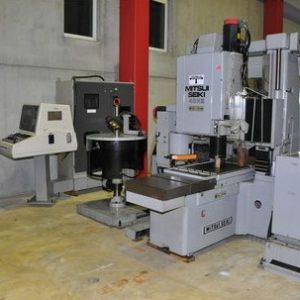
From Factory Floor to Your Workshop: Evaluating a Pre-Owned , Used , Secondhand, Surplus CNC Machines Before Purchase Mitsui-Seiki 4DNII – CNC JIG Coordinated Hole Grinding made in Japan
Here is a structured guide for evaluating a pre-owned / used / surplus Mitsui-Seiki “4DNII” CNC jig / hole grinding / coordinated hole grinding machine (or similarly classed 4DN / 4-axis jig /hole grinder), from factory floor to workshop. You can adapt the checklist to the specific machine’s features.
Because “4DNII” is a more obscure or legacy model, part of the process is trying to discover its original specs (or close equivalence) so you have baseline references.
0. Preliminary Research: Understand the Machine Class & Baseline Specs
Before visiting, collect as much documentation, brochures, or comparable listings as possible. For Mitsui-Seiki, here are relevant facts and similar models:
- Mitsui-Seiki is well-known for precision jig grinders, jig borers, and related high-accuracy machines.
- Mitsui’s “4DN / 4DNII / 4-axis CNC jig borer / grinding” machines appear in used listings (e.g. Mitsui Seiki 4DN 4-axis CNC jig borer & milling)
- There is a listing “Mitsui Seiki 4DN 4-axis CNC jig borer (and milling)” on machine listing sites
- Another listing “Mitsui Seiki CNC jig grinding 4GDN / 6GCN” appears, possibly a related or successor model.
Given that, the “4DNII” variant likely belongs to Mitsui’s 4-axis jig / hole grinding / boring line, combining fine positioning, coordinate boring, possibly with milling or grinding capabilities.
Key baseline parameters to determine (or try to recover) include:
| Parameter | Target / Expected Range* | Notes / Source Examples |
|---|---|---|
| Travel / Stroke (X, Y, Z, 4th Axis) | Possibly in the range of a few hundred mm in each axis | Example: 4-axis jig borers from Mitsui have travel ranges typical for machining workpieces with multiple hole coordinates. |
| Spindle / Boring / Grinding capability | Good rigidity, moderate rpm, precision bearings | For a fine hole grinder, high-precision spindle is crucial |
| Accuracy & repeatability | Micron-level tolerances, arc-second angular accuracy | Mitsui emphasizes tight tolerances in its premium machines |
| Control system / CNC / Feedback | Likely CNC with closed-loop axes, possibly FANUC or Mitsui’s proprietary control | The listing of used 4DN mentions “control, CNC (FANUC 6M)” in a used listing. |
* These are approximate or inferred ranges; your goal is to discover what the specific candidate is rated for.
Once you have some baseline spec expectations, use them as reference during inspection.
1. Visual & Structural Inspection
Start with a thorough visual check. Many defects or red flags are visible.
- Frame, bed, base — inspect for cracks, weld repairs, distortions, signs of collisions
- Column / gantry / cross slides — alignment, squareness, uniform wear
- Covers, guards, enclosures — ensure they exist and are in decent condition (missing covers often indicate neglect)
- Signs of coolant, oil, or lubricant leaks around spindle housing, slides, base, hydraulic or lubrication lines
- Evidence of corrosion, rust, pitting, or surface deterioration
- Identification plates & nameplates — serial number, model designation, manufacturer labels intact
- Wiring, cables, conduit — look for brittle insulation, splices, taped repairs, loose wiring
- Junction boxes, electrical panels — verify clean installation, absence of burnt marks or overheating evidence
Treat missing covers, exposed wiring, or heavily corroded parts as warnings (though not necessarily deal-breakers if repairable).
2. Power-Up / Control System Testing
Once the machine is powered up:
- Boot the CNC / control: note errors, alarms, or failure to start up
- Inspect the control interface: display, buttons, joystick, data entry devices — are they responsive, legible, undamaged
- Check axes command modes (manual / jog / MDI) — do X, Y, Z, and the 4th axis respond properly
- Jog axes with small increments — look for smoothness, stiction, binding, jumps
- Check for servo alarms or fault histories
- Verify limit switches and soft limits are working
- Check backup memory battery / non-volatile settings (older systems may lose parameters when battery is dead)
- Examine control firmware / software version; ask if updates are possible or how obsolete the system is
- Check I/O modules, limit sensors, proximity switches, emergency stops, interlocks
If possible, see the axis movement graphs (velocity, acceleration) to detect abnormalities like unexpected delays or overshoot.
3. Spindle / Boring / Grinding Head & Tooling
This is one of the most critical subsystems:
- Spindle run-out: mount a precision test bar or collet, spin at various speeds, measure run-out / radial deviation
- Bearings’ sound & temperature: listen for hums, rattles; let the spindle run for some time and feel for overheating
- Taper / interface wear: check for nicks, scoring, wear in the spindle bore, collet seat, or tool holder interface
- Spindle speed range: command slow, medium, and high rotations (if the machine supports it), observe stability
- Toolholders / collets / boring bars: inspect associated tooling interfaces, check for wear or damage
- If grinding / fine boring capability: check if there is a grinding wheel or fine finishing head, and test how it behaves (smoothness, vibration)
- Cooling / lubrication in spindle: if the spindle is oil-cooled or has internal lubrication, check its condition (oil cleanliness, leak, pressure)
Any abnormal noise, vibration, or heating is a red flag. Ideally run spindle under load (gentle cutting or grinding) if possible to reveal hidden defects.
4. Axis Slides, Guides, Lead Screws, Ball Screws
Check how well the axes are maintained and whether wear or backlash is beyond acceptable limits.
- Move axes through full stroke; check for smoothness, dead spots, rough travel, binding
- Use dial indicator or laser interferometer to check straightness, flatness, squareness across axes
- Measure backlash in each axis (X, Y, Z, 4th axis) at various positions
- Inspect slide surfaces / ways: look for scratches, pitting, corrosion, wear lines
- Check lubrication system: automatic oiling, lines, filters, reservoirs, flow continuity
- Inspect way covers, scrapers, bellows, protective covers — they should protect slides from chips/dirt
- Examine the ball screws or lead screws: feel for irregular motion, wiggle, pitch error or wobble
- Check roll or linear guides (if present) for smooth motion and lack of play
If the machine has differential error mapping or compensation, verify those maps (if accessible) or ask for the compensation record.
5. Coordinate / 4th Axis Mechanism, Rotary & Angular Accuracy
Because a “4DNII” suggests a coordinated 4th axis or indexing head, evaluation of this mechanism is vital:
- Operate the 4th axis through its full indexing / rotation, check for backlash, play, or errors
- Test the angular accuracy (index to known angles, check with sine bars, angular encoder)
- Look for wear in rotary bearings, gear teeth, drive systems
- Check clamping mechanism (if any) that locks the 4th axis — ensure it holds firmly without drift
- Monitor repeatability in angular moves
- For coordinate boring / drilling, check alignment of tooling relative to main axes
If the 4th axis is driven (servo or motorized), check its drive motors, couplings, encoders, wiring, and status history for errors.
6. Coolant, Chip Removal, Pneumatics / Hydraulics, Auxiliary Systems
These support systems often reveal hidden neglect:
- Inspect coolant pumps, tanks, piping, nozzles, filters. Check for contamination, sludge, leaks
- Test coolant flow under pressure, flush the lines if possible
- Check chip conveyor, auger, or chip disposal systems — see if they still operate smoothly
- Hydraulic and pneumatic circuits (if used for clamps, coolant valves, axis locks) — test pressure, leaks, valves, hoses
- Air supply / air lines, dryers, regulators — check condition and responsiveness
- Auxiliary systems: tool changer (if present), loading / unloading fixtures, automatic probing, tool setters
- Inspect electrical cabinets, drives, contactors, thermal management (fans, filters)
Missing or under-maintained support systems can severely degrade long-term reliability.
7. Metrology & Test Part / Accuracy Checks
Ultimately, the machine must be able to produce parts within your tolerances. Test it.
- Run a test hole grinding / boring / coordinate hole operation on a representative part, then measure that part (diameter, position, roundness, surface finish)
- Check positional repeatability (move to coordinates multiple times and verify return precision)
- Check linear accuracy by measuring along X, Y, Z axes with gauge blocks or precision instrumentation
- For the 4th axis, test angular accuracy and repeatability
- If possible, run thermal stability tests (operate for some time, then measure drift)
- Also check surface finish of holes (if grinding), compare with required quality standards
If the test part falls within your acceptable tolerances (or gives you room for compensation), that’s a strong positive.
8. Maintenance History, Documentation & Spare Parts
A machine’s service background and documentation often weigh heavily in its value and risk.
- Request full maintenance logs / records: repairs, rebuilds, part replacements, alignments over the machine’s life
- Ask for as-built drawings, wiring diagrams, parts lists, maintenance manuals, software backups
- Query which subsystems have been replaced (spindle, axes, control modules) and when
- Determine whether spare parts are still available or obsolete (especially for control, encoders, spindle bearings)
- Inquire about software licensing, backup strategy, parameter backups, CNC customization
- Ask about previous operating environment (clean shop or dusty environment, humidity, etc.)
- Clarify if any modifications or retrofits have been done (and whether documentation for them is present)
A well-documented machine is less risky; missing documentation is a cost and risk factor.
9. Environment, Installation & Transport Considerations
Even a technically sound machine can become problematic if this is overlooked.
- Determine the machine’s footprint, weight, and foundation requirements
- What kind of floor or base does it need (reinforced slab, vibration isolation)
- How will it be moved and rigged (cranes, supports, bolt-down, leveling)
- Power requirements (voltage, phase, amperage), cooling or air supply needs
- Environmental controls: does it need temperature regulation, humidity control, dust-free environment
- Access (doors, ceiling clearance) in your workshop to bring it in and install
Accounting for installation cost, alignment, leveling, and setup should be included in your total purchase cost.
10. Red Flags & Warning Signs to Watch For
During the evaluation, watch out for these potentially serious issues:
- Spindle with excessive run-out, noise, vibration, or heating
- Axis backlash or play beyond acceptable limits
- Jumps, dead spots, binding in axes
- Control failures, repeated faults, obsolete or unsupported CNC
- Worn or damaged slideways, scrapers missing, heavy wear
- Leaking hydraulic/pneumatic lines, coolant contamination, rust inside coolant tank
- Poor or missing documentation, missing parts
- Previous collision damage or rough repair patches
- Obsolete or unavailable spares for control, encoders, spindle bearings
- Electrical / wiring problems: melted insulation, messy splices, bad grounding
- Inability or refusal to run a test operation or produce a sample part
Any of those issues should lower the machine’s valuation significantly (or lead to rejection, depending on severity).
11. Estimating Remaining Life & Pricing Strategy
After inspection, you’ll need to judge how much life remains (or how much refurbishment is needed) and whether the asking price is acceptable.
- Consider age and usage: more cycles, heavier use, or continuous operation may shorten life
- Check which major subsystems have been overhauled (spindle, axes, control)
- Assess wear and needed repairs / refurbishments: alignment, replacing bearings, reworking worn slides, control updates, cleaning
- Estimate refurbishment costs (parts, labor, calibration)
- Compare with market comparables: find similar Mitsui 4DN / 4-axis jig grinders or borers sold recently and adjust for condition, features, and refurbishment needs
- Include transport, rigging, installation, calibration costs in your total cost of acquisition
- Always build in a risk margin for unforeseen issues
A commonly recommended approach is:
- Start with a baseline “market value” for a well-conditioned equivalent unit
- Deduct for visible issues, refurbishment costs, missing documentation, risk factor
- Add in logistics / installation costs to get your “all-in” price
- Use that to negotiate downward, leaving room for surprises
If the machine, after refurbishment, can meet your required tolerances and productivity, it can still be a good acquisition, even if the purchase price seems low.