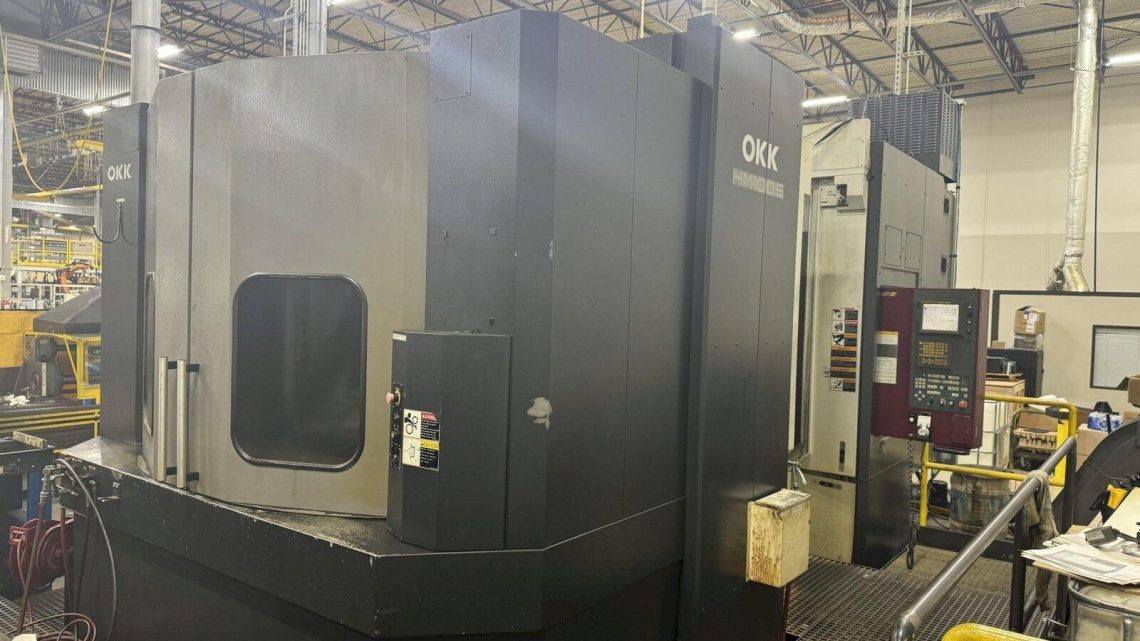
Before You Buy: Essential Criteria for Evaluating a Used, Second-Hand, Pre-Owned, Surplus OKK HM100S CNC Horizontal Machining Center made in South Korea
Here is a detailed (and somewhat “over-engineered”) checklist of what to inspect, test, or verify when considering buying a used OKK HM100S (or similar South Korean horizontal machining center). Use it as a guide to help you spot problems, estimate refurbishment costs, and negotiate more confidently.
Because heavy CNC machines are complex systems, a used or surplus unit can hide many issues. The better your due diligence, the lower your risk.
1. Understand the “As New / Nominal” Specification & Configuration
Before visiting the machine, gather the original (or intended) spec sheet. For the HM100S, typical or advertised specifications include:
| Spec | Typical / Advertised Value* |
|---|---|
| Pallet size | 39.4 in × 39.4 in (1,000 mm × 1,000 mm) |
| Pallet load capacity | ~5,512 lb (≈ 2,500 kg) |
| Traveling axes (X / Y / Z) | ~55.1 in / 43.3 in / 39.37 in |
| Spindle | CAT 50 taper, up to ~8,000 rpm (in many configurations) |
| Spindle motor | ~40 hp (some list 40/30 hp) |
| Tool magazine / capacity | ~60 tools (standard) |
| Pallet change / shuttle / indexing | 2-station pallet shuttle, 1° B-axis indexing, etc. |
| Coolant through spindle / high pressure coolant | Many ads list “TSC (through spindle coolant)” or “coolant through spindle” option |
*Note: “typical” does not guarantee the machine you inspect has all features or was built to full spec. Always check the as-configured specification with the seller.
Why this matters: the better you know what the machine should be, the more easily you can spot deviations, missing options, or underpowered components.
2. Visual & Structural Inspection
Even before powering up, walk around the machine and inspect key structural, mechanical, and external signs of abuse or neglect.
| What to Look For | Why It Matters / What It Indicates |
|---|---|
| Frame, base, casting cracks, weld repairs | Lack of structural integrity can cause misalignment, chatter, poor accuracy |
| Surface corrosion / rust on slides, rails, covers | Indicates poor maintenance or environmental exposure |
| Bent, deformed covers, way guards, bellows | May allow chips/coolant ingress → accelerated wear |
| Loose bolts, missing guards, external damage | Hints at rough handling, poor upkeep |
| Evidence of flooding, coolant leaks, oil leaks | Can hide damage to internal components or require rework |
| Condition of chip conveyor, scrap removal, chip protection | Poor chip removal leads to accumulation, wear, damage |
| Labels, nameplates, rating plates, wiring tags intact | Helps confirm build variant, power ratings, and traceability |
Ask: Has the machine been moved or reinstalled multiple times? How was it transported? Poor rigging can warp structures.
3. Control, Electrical & Cabling Systems
Because the CNC’s “brain” and electrical systems often determine usability and retrofit cost, they deserve careful scrutiny.
- Control type / version
Confirm exactly which CNC control is installed (e.g. Fanuc 160IS, Fanuc 160IS-MB, Mitsubishi, etc.)- Are the control modules original or replaced?
- Are backups, parameter files, documentation, and manuals included?
- Are the drives, servo amplifiers, spindle drive, power supply cards all present and working?
- Are there any custom or proprietary modifications?
- Wiring, cabling & connectors
Check for brittle insulation, chafing, damaged cable jackets, missing strain reliefs, or junction boxes showing signs of overheating.
Inspect wiring harnesses between axes, control, power panels, and spindle. - Electrical cabinet / panel
Open cabinets and look for cleanliness, rust, evidence of moisture, burnt traces, or signs of shorting.
Are fuses, contactors, cooling fans, ventilation filters, and cable ducts well maintained? - Power requirements
Ensure the machine’s voltage, phase, amp draw requirements match your facility—or check what it would cost to adapt power.
Ask if a transformer or additional power infrastructure was used. - Grounding & shielding
Proper grounding and shielding are essential to prevent electrical noise, interference, and controller faults.
4. Mechanical Motion & Components
Once you power up (or at least with power and safe test mode), inspect axis motions, backlash, and condition of mechanical subsystems.
4.1 Linear Guides, Bearings, Ball Screws
- Check for smooth motion in all axes (X, Y, Z, and B if present) with minimal binding or stiction.
- Listen/feel for scratchiness, distinct “bumps,” or metallic noise, which may indicate damaged roller bearings or degraded lubrication.
- Check the preload or play/backlash in each axis. Use test indicator to measure backlash at a point near the axis mid-stroke.
- Inspect ball screw covers or guards for damage; open where safe and inspect for pitting, corrosion, wear, or scorch marks.
- Inspect recirculating ball nut condition (if accessible).
- Check for uniform lubrication — are the lubrication pumps, lines, and delivery systems intact? Are oil lines clogged or starved?
4.2 Spindle & Taper
- Verify the spindle runs freely (with no binding) when turned (if possible) in manual mode.
- Listen for abnormal clarity, rumble, or vibration by spinning lightly (if safe).
- Check spindle taper for wear, nicks, or deformation.
- Check drawbar, clamping mechanism, and integrity of the internal clamping hydraulic / pneumatic system (if used).
- Check for runout using a precision indicator (e.g. place test bar, indicator near nose, rotate spindle).
- Inspect the spindle bearings via thermal characteristics, audible behavior, or by reviewing historical temperature logs (if available).
4.3 Rotary / B-Axis or Index Table (if present)
- If the machine has a B-axis or pallet indexing, check the table rotation, backlash, smoothness, and indexing accuracy.
- Verify the underside of pallets, indexing mechanisms, clamping surfaces, and alignment.
4.4 Tool Changer & Magazine
- Inspect the tool magazine carousel or chain for wear, alignment, and smooth motion.
- Cycle the ATC (automatic tool changer) through its full range and observe the motion / indexing, jams, or misalignment.
- Inspect grippers, fingers, tool holders, and jaws for wear or damage.
- Check tool-to-tool and chip-to-chip times, and how consistently the machine cycles.
- Verify that the tool management / pocket assignment logic in the control is correct, and no mismatches.
4.5 Pallet Shuttle / Pallet Changer
Because the HM100S often comes with a 2-station pallet shuttle, that mechanism must be tested:
- Observe the shuttle’s motion between pallet stations for smooth transfer, alignment, repeatability.
- Confirm edge alignment, reference surfaces, mechanical indexing pins, sensors, and safety interlocks.
- Measure repeatability of pallet positioning at both stations (e.g. mount a test bar, check runout or alignment before/after swaps).
5. Calibration, Accuracy & Geometric Tests
Even a structurally sound machine may need re-calibration. Request or perform the following:
- Straightness / flatness tests on each axis (e.g. use precision ground bar and dial indicators).
- Squareness between axes (X vs Y, Y vs Z, etc.).
- Volumetric accuracy / compensation tests (if equipment or test program is available).
- Thermal drift / stability: look for evidence the machine was run warm and cooled, check for residual thermal distortions.
- Run a test cut (if possible) using a known part geometry or test piece and inspect resulting tolerances.
6. Controls, Software, and CNC Data
- Ask for the CNC program memory, backups, and whether the original (or working) control software, operating system, and parameter files are present.
- Ask whether the control can communicate (e.g. via RS232, Ethernet, USB, or network) for program download/upload.
- Confirm whether features such as advanced tool compensation, macro programming, linear / circular interpolation, custom cycles, probing cycles, etc., are functional.
- Ask about any custom modifications, retrofits, or non-standard options (e.g. high pressure coolant, chip flushing, high speed machining packages).
- Check for diagnostics or fault logs on the controller; review any existing error/fault logs, maintenance logs, or maintenance history if available.
- Confirm whether manuals, wiring diagrams, PLC diagrams, and spare parts lists are included.
7. Utility & Auxiliary Systems
A “machine” is more than its moving parts. These supporting subsystems often determine reliability and cost.
- Coolant / lubrication / hydraulic systems
- Condition, cleanliness, and quality of coolant tanks, filters, pump(s), piping, nozzles.
- Any signs of contamination (iron oxide, tramp oil, sludge) or leaks.
- Whether coolant system supports through-spindle coolant (TSC) (if advertised).
- Whether oil/lube pumps are functional, whether auto lubrication works, or any bypass or clogs.
- Chip removal / conveyor / chip flushing
- Verify that chip conveyor works, is sized properly, and removes chips reliably.
- Check for broken parts, jams, missing paddles, worn chain links.
- Check whether the machine has a chip sluice, flushing lines, or flood coolant system.
- Coolant / temperature control / spindle chiller
- If there is a spindle chiller or thermal control system, verify its operational status.
- Inspect plumbing, heat exchanger, coolant quality, and fluid circuits.
- Air supply / pneumatic lines
- For components like tool clamping, pneumatic actuators, check the integrity and dryness of the air system, regulators, filters, lines, and valves.
- Exhaust / fume / dust / mist collection
- Check whether dust/mist collection, ventilation, or chip handling systems are intact.
- Electrical power / utility supplies
- Examine how the prior user powered the machine (transformer, dedicated feeder, power conditioning).
- Determine whether your shop’s utilities (voltage, phase, current capacity) can support the machine.
8. Maintenance History, Usage, and Documentation
- Ask for maintenance logs (lubrication records, spindle rebuilds, preventative maintenance, parts replacements).
- Ask for utilization history — hours of operation, types of parts run (heavy cuts vs light work), any known crashes or misuse.
- Ask if the machine was in a continuous production environment, intermittent use, or idle.
- Inspect for signs of modification or “jury-rigged” repairs (patches, welding, nonstandard parts).
- Ask whether original manuals, spare parts lists, schematics, drawings, and software discs are available.
- Inquire whether the seller or prior owner performed alignment or calibration services, and whether recent inspection / certification is available.
9. Test Running & Performance Verification
If possible, run the machine in a “demo mode” or trial run before final purchase:
- Power up & boot procedures — observe whether the controller boots cleanly, whether any fault codes appear, how stable it is.
- Jog / manual motion — move each axis across full travel; observe smoothness, noise, binding, or jumps.
- Homing, referencing, limit switches — check whether limit/home switches work properly and reproducibly.
- ATC / tool change cycle — run through tool change cycles, test speed, repeatability, mis-insertions.
- Pallet change / indexing cycles — verify pallet shuttle, alignment, referencing, and repeatability under load.
- Spindle ramp-up, speed sweep — bring the spindle up to higher rpm (if safe) and monitor vibration, noise, runout, spindle temperature, stability. If possible, with a test bar, check spindle deviation during rotation.
- Cut trial (if test material available) — under light test cuts, evaluate surface finish, dimensional accuracy, chatter, and stability.
- Load / soaking test — run the machine in a real cycle (or simulated load) for some time to see whether any thermal drift, faults, or instabilities appear.
10. Metrics & Measurements to Benchmark
Here are some benchmark measurements and tolerances you should attempt to collect:
- Backlash in each axis (ideally < a few microns, depending on age / wear)
- Repeatability and repositioning accuracy
- Runout of spindle at various lengths
- Pallet repeatability across indexing (before and after shuttle)
- Table flatness or deviation
- Geometric squareness between axes
- Angular error in B-axis (if present)
- Thermal drift over operating period
- Vibration / acoustic anomalies during runup
- Spindle bearing temperature data
- Current / power draw during operation
Gathering numeric measurements gives you leverage in negotiation and comparison among candidates.
11. Spare Parts, Consumables & Supportability
Even if everything checks out, availability of spare parts, consumables, and technical support may determine long-term viability.
- Ask whether original spare parts were kept (bearings, seals, guides, covers, magnets, fans, filters, belts, etc.).
- Check whether the manufacturer (OKK or authorized dealers) or third-party suppliers still support replacement parts, especially for critical items (spindle bearings, linear guides, control modules).
- Ask whether common wear items (way cover bellows, chip seals, wipers) are readily replaceable.
- Check whether replacement ATC gripper kits, tool holders, or magazine parts are available.
- Check whether the control / CNC modules are still supported, or whether you may need to retrofit newer electronics in the future.
- Check whether local service, field engineers, or refurbishing capability exist nearby (in Türkiye or regionally) for support or repair.
12. Warranty, Guarantees, or Refurbishment Clauses
Because used machines carry more risk, try to negotiate protections:
- A limited warranty (e.g. 30–90 days) on major subsystems (spindle, drives, pumps).
- Acceptance period or “burn-in” period, during which you can test thoroughly and return if problems arise.
- Conditional acceptance (e.g. payment after successful test run) rather than full upfront payment.
- Price hold or discount for specific known repair items (e.g. if spindle bearings are bad, deduct anticipated cost).
- Seller to supply all documentation, parts lists, programming, and test logs.
13. Transport, Installation, and Leveling Considerations
- Check how the machine will be transported: disassembly, lifting points, rigging, shipping cost, reassembly risk, packing.
- Ask about floor loading, foundation requirements, leveling, tie-downs, and site preparation.
- Estimate the cost of installation, alignment, test run, and calibration at your site.
- Consider whether a crane or heavy-lift equipment is needed on your shop floor.
- Ask whether the machine was previously leveled on a proper foundation; if not, you may have to re-level or re-baseline.
14. Cost Estimation & Total Cost of Ownership (TCO)
Make a “budget-to-own” estimate including:
- Purchase price
- Transport and rigging / installation costs
- Re-alignment, calibration, and test cutting
- Spare parts / repair / refurbishment (bearings, guides, seals, electronics)
- Consumables (lubricants, coolant, filters, belts)
- Downtime and the risk of hidden failures
- Software, documentation, and CAD/CAM integration
- Operational power consumption, utilities
- Long-term support, parts, and maintenance cost
Use your benchmark measurements to estimate likely refurbishment cost (e.g. if spindle is borderline, plan to budget bearing replacement).
15. Red Flags & Deal Killers to Watch Out For
- Spindle bearing chatter, slip, or noise — often costly to repair
- Excessive backlash or wobble in linear axes
- Misaligned or seized ball screws
- Missing modules in the control, or unlicensed/custom control software
- Cracks, welds, or structural damage to the machine base
- Poor or no documentation, missing wiring diagrams, missing manuals
- Non-original or “Frankenstein” modifications (nonstandard electronics, hacked wiring)
- Hidden defects revealed only after installation
- No spare parts or support for the machine variant
- Inadequate test time or refusal to demonstrate under load
- Overpriced “as is” deals that ignore the cost to bring the machine to fully working condition