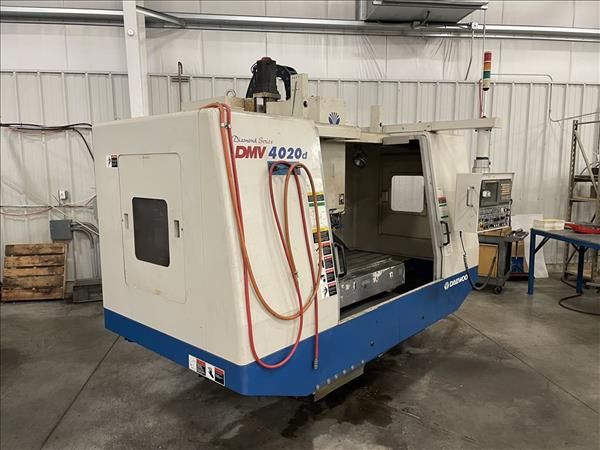
Avoid Costly Mistakes: Professional Tips for Purchasing a Pre-Owned / Second-Hand / used DOOSAN DMV-4020D?
Here are detailed, professional tips & warning signs for buying a used Doosan DMV-4020D vertical machining center. It’s a good machine, but as with any large CNC VMC, there are many places where hidden wear or issues can cost you dearly unless you inspect thoroughly.
What You Should Know Up Front: Key Specs / What to Expect
Before you inspect one, know what the DMV-4020D should offer (or what variants are typical), so you can spot deviations or “downgraded” units. Various listings show:
| Spec | Typical / Published Value for a DMV-4020D |
|---|---|
| Control | Fanuc 21i-MB (3-axis) |
| Table size | ~ 47.2″ × ~ 19.7″ |
| Travels (X / Y / Z) | ~ 40.1-40.2″ in X; ~ 20.1-20.5″ in Y; ~ 24.6″ in Z |
| Spindle taper / motor / speed | CT-40 (or CAT-40), about 8,000 rpm; motor around 20-25 hp in many units |
| Tool changer capacity | Often 24 tools; some earlier units have 16 ATC stations |
| Rapid traverse rates | In some listings, about 1,181 ipm in X/Y axes, etc. |
These specs are important benchmarks. If what the seller claims is much less, or parts are degraded (so performance is much worse), you’ll need to adjust pricing accordingly.
What to Inspect / Test On-Site: Key Areas & Checks
Here is a checklist of what to test, what to look for, and typical wear-/damage modes. Bring measurement instruments (dial indicators, test blanks, thermal sensor etc.) if possible.
| Area | What to Inspect / Test | Why It’s Important / Common Failures |
|---|---|---|
| Spindle & Bearings | • Run spindle at low, mid, high speeds. Listen for abnormal noises (whining, grinding, knocking), feel for vibration. • Check spindle run-out at nose / taper / through taper if applicable. • Inspect spindle nose / taper for fretting or wear. • Check bearing heat after a period of running under modest load. • Inspect seals; check whether any coolant or lubrication is entering places it shouldn’t (bearing housing, spindle bore). | Bearing failures are expensive. Run-out reduces part accuracy, increases tool wear. Coolant leakage often leads to early bearing or spindle housing damage. If the spindle is noisy, that’s a big red flag. |
| Guideways / Slideways / Ball Screws | • Move X, Y, Z axes through full travel; see if motion is smooth throughout, check for dead spots, binding or uneven movement. • Check backlash by moving to a location, reversing, and measuring. • Visually inspect linear rails or ways: wear marks, scoring, rust or pitting, especially on exposed ways. • Check ball screws: check for play, noises, smoothness of motion. • Test lubrication of ways and screws: are automatic lubrication / grease / oil systems working; any leaks. | Worn guideways or screws degrade repeatability, surface finish, alignment. If the guides are badly worn, restoring them (regrinding or replacing) is costly. Poor lubrication accelerates all wear. |
| Tool Changer (ATC) | • Cycle ATC multiple times (empty tool cycles if necessary) to check indexing, speed, smoothness. • Look for mis-indexing, hesitation, or gripping issues. • Inspect sensors / proximity switches for tool clamp / tool position is correct. • Examine the tool holders: condition, fit, wear. | ATC issues can kill production throughput, cause mis-tooling, or damage tools/spindle. Replacing or aligning ATCs and their sensors is nontrivial. |
| Machine Accuracy / Test Cut | • Do a test machining job (if possible) that is similar to your future work: rough + finish cuts. Check surface finish, dimensional accuracy, repeatability (make a part, measure, re-run the same program, see variation). • After warming up the machine, check whether dimensions drift. • Check squareness: X vs Y, Y vs Z, etc. • Check whether the machine can maintain accuracy under heavier cuts. | Many problems show only under load, or when the machine has heated up; what looks OK cold may be different after temperature cycles. Accuracy and repeatability are often what you’re really paying for. |
| Control / CNC / Electronics | • Boot up control, see if error/fault logs are present. • Check display / screen / keypads / emergency stop / limit switches. • Inspect wiring, connectors, look for signs of overheating, burnt smells or moisture. • Confirm control parameters are correct; memory retention, backups. • See if firmware / software / control boards are still supported (spare parts, etc.). • Check whether all axes drive motors and servo drives are healthy (listen for motor noise, check during movement). | Control failures can stop the machine dead. Obsolete parts / unsupported firmware can make maintenance very expensive or reduce uptime. Poor wiring causes intermittent failures. |
| Coolant, Filtration & Lubrication Systems | • Inspect coolant system: tank, filters, pumps; whether coolant is clean, free of rust or sludge. • Coolant lines, nozzles: are they intact, leaking? Is the coolant flow sufficient for large cuts. • Lubrication: are way/oil/grease lubrication systems working; any leaks; consistency of oil supply. • Check chip removal (chip conveyor or auger) system; how well it handles chips; any backups or clogging. | Coolant neglect leads to corrosion, wear, machining issues (thermal, surface finish). Poor lubrication is one of the biggest causes of mechanical breakdown in used CNCs. Chip accumulation can damage ways, interfere with moving parts. |
| Physical / Structural Condition | • Check base / foundation / mounting: is the machine level, has it shifted; any signs of base cracking or past accidents. • Inspect wiggle / vibration in the frame or head under load. • Examine all covers / guards / bellows / way covers: are they intact; any damage from chips or coolant leakage. • Check table top condition: flatness, T-slots condition, wear or damage. • Visual checks for rust, deterioration, paint condition (poor paint may indicate neglect). | Structural misalignments or damage lead to poor accuracy; broken covers allow chips & coolant to enter vulnerable parts; base shift can cause cumulative wear. Table damage directly impacts quality of work. |
| Power / Utilities / Infrastructure Compatibility | • Verify that your shop has the correct power supply (voltage, phase); check what the machine currently uses and whether any transformers are needed. • Check that your floor / foundation can take the machine weight. • Confirm there is sufficient room for transport, installation, removal, access for maintenance. • Check whether cooling, ventilation, chip disposal, and environmental (temperature, humidity) conditions in your facility are appropriate. • Check if hydraulic or pneumatic systems exist, and their condition. | Even a high-quality machine becomes expensive if setup / infrastructure cost is large or delayed. Poor environmental conditions cause premature wear. Installation issues often underbudgeted or ignored. |
| Usage & Maintenance History | • Ask for machine hours, ideally breaking out “cutting hours” vs “powered on / idle.” • Maintenance records: when bearings replaced; lubrication schedule; any major repairs; whether head/spindle has been rebuilt. • Operating environment: cleanliness; coolant quality; sawdust, dust, moisture; how regularly the machine was cleaned. • Any history of collisions, misuse, overloading. • Whether original manuals, parts catalogs, electrical diagrams are included. | A well-maintained machine will likely have fewer unseen problems. Environmental neglect, missing parts or undocumented past damage often cause later expense. Having documentation greatly helps in future maintenance and part sourcing. |
Red Flags / Deal Breakers
When inspecting, if you hit any of the following, be very cautious. In many cases, unless the seller is offering a very significant discount or is willing to address the problem, these are deal-killers or things that should heavily impact your negotiation.
- Spindle noise / vibration / heat: Bearing or internal spindle problems that are audible or evident under minimal load.
- Large run‐out at spindle or table, cannot be remedied easily.
- Severe backlash in axes or sloppy motion: e.g. Z-axis or X/Y screws pointing to significant wear.
- Guideways with damage: deep scoring, rust, pits, visible wear. If way covers are damaged or missing.
- ATC failure / erratic tool changes: misindexes, delays, sensor errors. If the ATC is unreliable, tool theft / damage risk increases.
- Electrical faults / burnt components / moisture damage in control cabinets; intermittent errors.
- Coolant or lubrication system deficiencies: leakages, dirty coolant, inadequate filtration.
- Structural issues: tabletop warped, base cracked, misaligned frame, things look like they have been crashed or hit.
- Missing or obsolete parts / no documentation: if manuals or parts are missing or control boards are out of support.
- Seller refuses test cuts or showing performance under load or after warm-up: if they say you can’t run something similar to what you’ll produce, that’s a warning.
Likely Problem Areas (From Similar Doosan / DMV Series)
From case studies / forum posts and repair records, some specific issues are known to occur in Doosan / DMV machines, which you should check for specifically:
- Spindle contamination / coolant ingress: In a case with DMV-3016, coolant had contaminated the spindle interior; bearings failed; shafts had wear. This suggests that coolant seals, protective covers, or sealing around spindle / coolant paths are critical.
- Wear or damage in the housing bore or spindle shaft, possibly from past repairs or oversize fits.
- ATC interlock / tool change errors as the machine ages; sensors degrade or misalign.
- Coolant tank / filter / pump issues: dirty or clogged systems; sludge or chip build-up, impacting cooling, causing heat drift or damage.
- Wear in rapid traverse or servo axis behavior, especially if lubrication hasn’t been well maintained.
Negotiation Tips & Cost Buffering
To avoid surprises, plan for extra costs beyond the purchase price, and use negotiation to cover potential issues.
- Make the purchase conditional on passing a test cut: include a condition that the machine must produce a part (or samples) to your required tolerance.
- Request machine history: especially spindle rebuilds or major component replacements. If the spindle has already been rebuilt once, its remaining life may be less.
- Ask if spare parts or tool holders are included: buying a used VMC can be okay, but if you have to get new tooling, holders, spindle nose adapters etc., that adds up.
- Budget for refurbishment: possibly spindle rebuild, way scraping or linear rail replacement, ATC sensor repairs, control board spare parts, coolant/lubrication system overhaul.
- Estimate transport, rigging, installation & leveling: moving a heavy VMC like this, then getting it properly aligned & leveled, often costs more than expected.
- Infrastructure upgrades: power supply, chip disposal, coolant systems, safety equipment might need upgrading or adapting.
- Set aside downtime risk: even a “good” used machine may need adjustments, calibration, maintenance before it reaches full productivity.