What Should I Pay Attention To When Buying a Second-Hand / used OKUMA GENOS L250E-e?
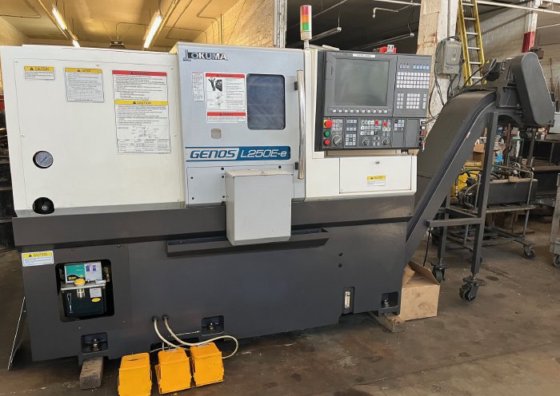
If you’re thinking of buying a used Okuma Genos L250E-e CNC lathe, there are many things you’ll want to check carefully so you don’t get stuck with hidden problems. Below is a list of what to pay attention to, what to ask, and common failure points. If you want, I can send you a printable checklist too.
Know the Baseline: Key Specs & Features
First, make sure you know what the original specs should be—this gives you a benchmark to compare the actual machine. Some specs of the Genos L250E-e to note:
- It’s part of Okuma’s Genos L-e series; marketed for high rigidity, good chip discharge, more powerful feed rates.
- Standard spindle: approx 3,000 min⁻¹; torque and power in spec depend on “30 min / continuous” rating.
- Turret options (V8 or V12), with certain upper limits on boring bar diameters etc.
- Tailstock, hydraulic tailstock optional; coolant tank design, chip conveyors and discharge designed to reduce accumulation; larger chip discharge outlet as improvement over older models.
Having the original manual or brochure helps to verify what’s supposed to be there in terms of travel, spindle power, turret spec, options.
Things to Inspect & Test
Below are mechanical, electrical, and operational items to inspect in person. Try to test under load if possible.
| Area | What to Check / Test | Why It’s Important |
|---|---|---|
| Spindle & Bearings | • Check radial and axial run-out using a test bar. • Listen for unusual noises (buzzing, grinding) when running at different speeds. • Inspect spindle taper, nose, chuck seat for damage. • Check spindle motor’s performance: does it heat up unduly? Does it deliver full power? | Spindle is central to precision. Excessive wear or damage means poor tolerances, shorter tool life, potential major repairs. |
| Turret / Tool Holder System | • Indexing accuracy: does the turret quickly and accurately move into each station, without drift? • Check for wear in the tool stations, alignment of tools. • If live tooling present, test it under load. • Look for consistency in clamping force and repeatability. | Turret misalignment or sloppy indexing causes machining errors, poor surface finish, wasted material. Live tooling adds complexity / wear points. |
| Axes, Guideways, Ball Screws | • Move each axis (X, Z, maybe Y if option) through full travel: feel for binding, stiffness, looseness. • Check backlash, especially in ball screws and nuts. • Inspect guideway surfaces (slides, ways) for wear, scoring, rust. • Check lubrication systems: automatic lubrication if present, whether oil is clean and free from contamination. • Inspect way covers and protection: are covers intact, clean, capable of keeping chips / coolant out of sensitive parts? | Worn guideways or screws degrade accuracy, increase vibration. Clean lubrication and protection extend life. |
| Control / CNC Electronics | • Check controller type & version; verify whether there have been upgrades or any known firmware issues. • Test limit switches and homing routines—do they work reliably? • Review alarm history or error logs if available. • Verify condition of wiring, connectors, sensors; any signs of overheating, corrosion or repair patches. • Test operator interface: does the screen respond well; are there lag or glitches? | Control problems can shut you down; fixing them may require specialist help or expensive parts. |
| Coolant, Chip Handling & Clean-up | • Check coolant system: condition of coolant (clean / contaminated), pump working, hoses, coolant lines, no leaks. • Chip conveyor (if installed): functioning, clean, no blockages. • Coolant tank: is it easy to clean, is it accessible (some models have slide-out coolant tank); checking whether previous operator maintained cleanliness. • Chip evacuation path: check chip discharge outlet; whether chips collect under slides or under bed—accumulated chips can cause pressure, distress, misalignment. | Poor chip handling leads to maintenance headaches, potential damage to way covers or axes, reduced machine uptime. |
| Physical Cleanup / Structural Condition | • Frame, bed, headstock: inspect for cracks, deformations, signs of collision. • Paint / corrosion: corrosion isn’t decisive but heavy rust in slides or other moving parts is warning sign. • Machine leveling: check whether machine is level; if previously installed mis-leveled, may cause aliasing / misalignments. • Guards, doors, safety interlocks: doors open/close; emergency stop; door interlocks function. | Structural integrity ties directly to machine life, precision. Safety features legally required and essential. |
| Test Machining & Accuracy | • If possible, run a sample job that’s representative of what you will do. Measure finished parts for dimensional accuracy and surface finish. • Test repeatability: move to position, retract, return; see how close it returns. • Run at slower speeds, higher loads, rough cuts; observe vibration, chatter, noise. • Test tool changes, if ATC / turret tool stations. | Performance under load reveals issues not obvious in idle tests. Repeatability critical for production. |
| Maintenance History & Usage | • Ask for operating hours, type of work (light finishing vs heavy cuts). • Have spindle bearings ever been replaced; how often is coolant replaced; how often is machine cleaned/serviced. • Any history of crashes or overloads. • Any parts already scheduled for replacement or known worn parts. | Helps anticipate future costs; decide how much “life” machine has left without major overhaul. |
| Power / Utilities / Installation Requirements | • Verify power supply is compatible (voltage, phase); look at wiring condition. • Evaluate air supply if pneumatic elements (e.g. chucks). • Foundation & floor: is machine installed on proper base; vibration minimized; environment temperature stable. • Space and access for service (can coolant tank be removed; space behind for electrical cabinet; ability to access all service points). | Good machine poorly installed or badly supplied will underperform or incur repair/downtime. |
| Spare Parts / Support | • Are replacement parts (bearings, way covers, coolant pumps, sensors) still being manufactured / readily available in your region? • Control parts / boards: how old are they; availability. • Technical support / service network for Okuma Genos in your area. • Cost of replacement spindles or major modules. | High downtime cost or not being able to source parts quickly or affordably can erode “value” even of a good machine. |
Known Issues / Red Flags Specific to Genos L250E Series
From what people report and forums, here are issues that tend to appear in this model. If you spot any, treat as warning signs and ask about cost/feasibility of repair.
- Spindle wear or need for spindle rebuild: users report that after a few years / heavy usage, the spindle may need bearing work.
- Coolant or chip accumulation under slides, way covers, or under the bed: chips can compact and cause pressure or misalignment / bounce. This has been reported in Okuma machines in general.
- Worn way covers, or badly sealed covers allowing chips / coolant intrusion. The way cover failure is common and parts are expensive.
- Motor / drive electronics issues: replacement of I/O modules, motherboard boards etc. have been needed by some users.
- Coolant tank maintenance: if the tank is difficult to access or poorly cleaned, rust / bacteria / coolant breakdown can damage pump and lines. Also impacts surface finish / tool life. The slide‐out coolant tank design helps, so check if that option is present/supported.
- Tool clamping fatigue: parts of tool clamping/changing systems sometimes fatigue over time (e.g., chucking kits) and break. Lead to downtime and possibly damage to parts.
Questions You Should Ask the Seller
To supplement your inspection, ask these questions. Some of the answers will save you headaches or help price negotiation.
- What is the total operating time / spindle hours / how many parts has it made?
- What was its typical workload (material types, cut depths, etc.)? Was it used for heavy machining or lighter work?
- What maintenance has been done: coolant changes, spindle bearing replacement, guideway lubrication, cleaning intervals.
- Any history of damage: crashes, overloads, parts replaced (chuck, spindle, turret, axis drives)?
- Are all options present/working? (tailstock, live tooling if any, chip conveyors, large turret, coolant flush, door auto, etc.)
- Can I see the machine under power and run a test job that replicates what I need to do (or close)?
- Are error / alarm logs available? Any frequent errors or faults?
- What spare parts are included or available (tooling, soft jaws, etc.)? What is cost / lead time for major components?
- Are all safety devices intact and working: door interlocks, emergency stop, lamps etc.?
- How stable is the installation environment: temperature, vibration, foundation?