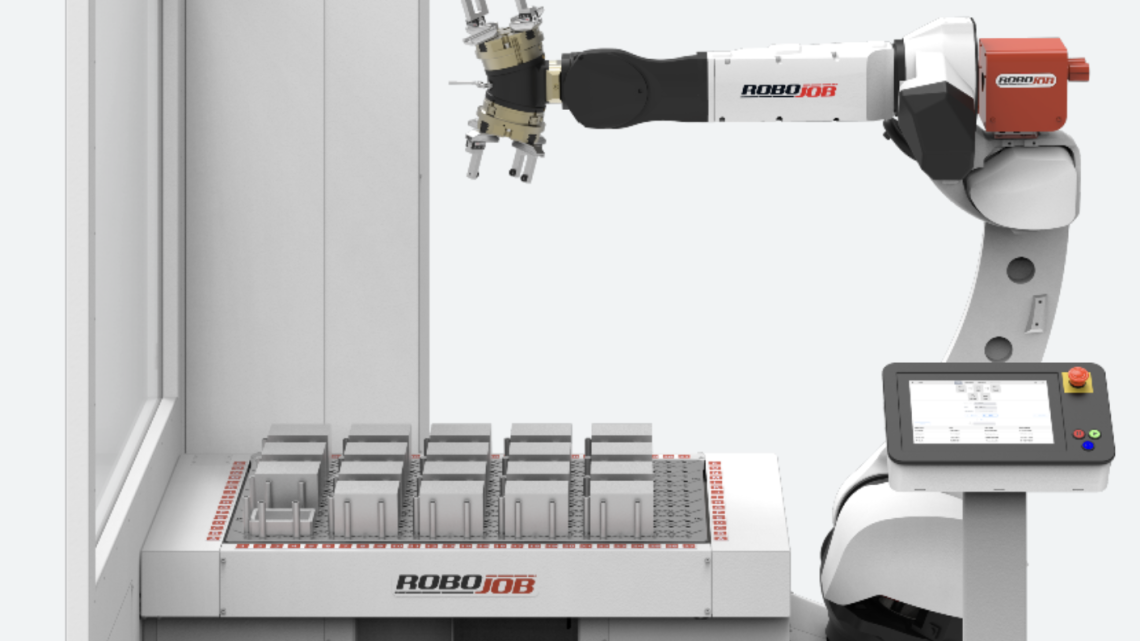
Smart Buyer’s Guide: How to Choose the Right Pre-Owned, Used, Secondhand, Surplus CNC Equipment Before Purchasing ROBOJOB Machinery Tending ROBOT R30IB
When considering purchasing a pre-owned / used / surplus RoboJob (or equivalent) machine-tending robot such as the RoboJob R30IB, you’re entering a more complex decision space than buying a used CNC mill or lathe. A robot tending system must integrate reliably with your host CNC, tooling, safety systems, and software environment. Below is a “Smart Buyer’s Guide” to help you evaluate and mitigate risk so your investment pays off.
I’ll break this down into two parts:
- What you need to know specifically about the RoboJob / robot tending system
- What general principles apply when buying used industrial automation and CNC-tending gear
You can also forward this to sellers or integrators for checklist evaluation.
1. What to Know About the RoboJob R30IB / Robot Tending System
Before diving into details, here’s what we know publicly about the R30IB:
- It is offered as a compact total solution for loading/unloading CNC milling machines.
- It belongs to RoboJob’s “M-20 series” (i.e. a mid payload, reach class) — capable of handling up to 25 kg and reach of ~2 m.
- RoboJob emphasizes that their robots are CNC-brand agnostic and meant to integrate with existing machines.
- RoboJob claims a fairly intuitive software interface (fast changeover) to reduce operator burden.
Because much of the risk lies in integration, the used-robot evaluation must be sharper than for stand-alone CNC machines.
Here are key areas/criteria to focus on for the RoboJob or similar machine-tending robot:
| Evaluation Aspect | Why It Matters / What to Check | Suggested Tests or Conditions |
|---|---|---|
| Mechanical (Robot Arm, Axes, Joints, Gearboxes, Cables) | The robot arm is the “muscle” — wear, backlash, misalignment or damaged cables will reduce precision or fail. | Jog the robot through its full envelope; listen for noise, stiction, binding. Inspect all cabling, protective coverings, flex cables for abrasion. Ask for lifetime cycles, maintenance logs on joints. |
| Payload & Reach vs. Your Part Mass & Geometry | The R30IB has defined payload and reach — if your parts exceed or push near limits, reliability and cycle times suffer. | Confirm the payload rating (mass + gripper) at the furthest reach. Test with your heaviest parts in representative positions. |
| End-of-Arm Tooling / Gripper Compatibility | The gripping mechanism is critical — if existing grippers don’t suit your parts, you’ll need custom tooling (cost). | Examine the included gripper(s). Are spares or compatible tooling available? Are interfaces documented? See if the system supports quick-change tooling. |
| Control Hardware / Electronics & Safety Systems | The brain and nerves of the robot — outdated or failing electronics can be hard to repair or replace. Safety interlocks are legally required in automated cells. | Inspect controller cabinets for dust, corrosion, water damage. Verify the safety circuit, e-stop, door interlocks, light curtains, relays. Check wiring harness integrity. |
| Software / Robot Programming & Licensing | The software must still run, and ideally you’ll have source or license rights. If it’s locked or proprietary, future support can be difficult. | Ask for licenses, source files, backups. Ensure the software boots, the user interface functions, that motion programs are stored and editable. Ask whether upgrades or patches are available. |
| Integration with CNC & Host Machine Interface | The biggest risk is communication and synchronization errors with the CNC. | Test full cycle: robot pick-up, loading, CNC machining, unloading, error handling, recovery. See whether communication is via standard protocols (EtherCAT, TCP/IP, I/O, etc.). Check on latency, reliability, error recovery. |
| Calibration, Repeatability & Accuracy | Robot tolerances drift over time. | Run calibration routines, measure repeatability, run test parts, check deviation. Use your own coordinate frames / reference parts. Ask for historical calibration records. |
| Wear Items & Spare Parts Availability | Some components have finite life (bearings, belts, encoders, gearboxes). If spares are unavailable, your system could be stranded. | Ask for a list of consumables, spares, costs. Are parts still manufactured or obtainable via third parties or RoboJob? |
| Support & Documentation / Manuals / Schematics | For servicing, troubleshooting, modifications, you’ll need full documentation. | Ensure you get mechanical and electrical drawings, wiring diagrams, software flowcharts, manuals. Confirm that RoboJob (or local integrator) will provide some support for the used unit. |
| Uptime / Cycle Usage / Lifetime Hours | Like any machine, usage history tells a story. | Ask for total hours (or cycles) run in duty mode. Look for peak usage periods, downtime history, previous breakdowns or repairs. |
| Physical Condition (Signs of Abuse, Damage, Environment) | A robot used in a harsh environment (coolant, chips, particulate) will degrade faster. | Inspect enclosure panels, wrist joint seals, cable protection, signs of coolant ingress, chip/dirt accumulation. Check alignment and rigidity of mounting. |
| Return on Investment (ROI) in Your Application | Even a used robot must justify itself — can it bring you extra spindle hours or reduced labor? | Model cycle time gains, cost of refurbishment/spares, downtime risk. Compare against new or alternative automation. |
If you can get the robot into a test cell (or have a remote demo), run a “full mission” test using your actual parts and workflow. That reveals most hidden issues.
2. General Principles & Checklist for Buying Used CNC / Automation / Robotics Gear
Here are lessons and best practices drawn from buying used CNC machines and automation systems (not just robots). Many of these carry over:
A. Visual & Structural Inspection
- Inspect the frame, welds, foundations, mounting fixtures for cracks, deformation, or repairs.
- Look for surface rust, corrosion, pitting, damage to covers or guards.
- Check all access covers, cable carriers, protective conduits.
- Look for signs of abuse: dents, misalignment, impact damage, repairs.
B. Spindle, Joints, Bearings & Actuators
- Run the spindle (for a CNC machine) at high RPM and listen for abnormal noise, vibration, or heat.
- In a robot, similarly move the axes and check for smoothness, backlash, jerky motion.
- Check bearings, ballscrews, linear guides for wear, scoring, looseness.
- Use test indicators to check for run-out or deviation.
C. Control & Electronics
- Power up the control panel, check all displays, buttons, indicators.
- Review wiring harnesses, connectors, cable strain reliefs, and cleanliness.
- Look for burn marks, overheated components, corroded contacts.
- Ensure all modules, I/O boards, PLCs, drives are present and functional.
- Check for firmware or version mismatches, and whether updates are available.
D. Software, Memory, Communication & Backup
- Confirm that CNC / robot programs can be uploaded/downloaded (via USB, network, etc.).
- Check if the control’s memory is intact and that there are no alarms or “memory lost” histories.
- Request backup media, NC programs, source files, patches.
- Examine communication interfaces (Ethernet, fieldbus, RS-232, etc.) and ensure compatibility with your systems.
E. Documentation, Schematics, Maintenance Records
- Insist on having mechanical, electrical, and software schematics, wiring diagrams, bills of materials.
- Request logbooks, preventive maintenance records, past repair invoices.
- Seek serial numbers, revision history, part change history.
- If manuals are missing, try to verify availability through OEM or aftermarket sources.
F. Spares & Consumables
- Make a parts list: belts, couplings, seals, bearings, encoders, sensors, tool changers, couplers.
- Check availability and lead times for critical spares.
- Ask whether some spares are already included in the sale.
- Estimate annual consumables cost for your planned usage.
G. Testing Under Load / Full Cycle Testing
- Always test in real (or simulated) operating conditions with representative loads / parts.
- Run several complete cycles (start-to-finish) and see if there are any surprises or faults.
- Monitor temperature, vibration, error rates, drift, and repeatability.
- Test recovery from errors (e.g. e-stop, manual intervention, resume).
H. Alignment, Calibration, Accuracy & Repeatability
- Use reference test parts or gauges to verify machining or robot positioning.
- Check drift over time, repeatability, hysteresis, backlash.
- Ask if the machine/robot has been recently calibrated; if not, how much effort it would take.
I. Transport, Installation & Commissioning Costs
- Transport and rigging of heavy automation equipment can be expensive (cranes, fixtures, shock protection)
- On-site leveling, anchoring, alignment, wiring, safety setup, calibration, and commissioning add cost.
- Check whether the seller offers support for installation, software commissioning, or training.
J. Legal, Warranty, Liability & Support
- Clarify transfer of any remaining warranty (if OEM warranty still applies).
- Define liability: who is responsible for component failures discovered after purchase.
- If possible, include acceptance tests or performance guarantees.
- Confirm whether OEM or integrator support is available in your region (for spare parts, technical help, firmware fixes).
K. Price vs. Risk vs. Upgrade Cost
- The price saving must compensate for refurbishment risk, spare parts cost, downtime, and lack of warranty.
- Estimate “worst-case” retrofit cost (e.g. replacing drives, controller, robot arm, wiring).
- Compare with buying new or newer used — sometimes spending more reduces risk drastically.
- Consider also future flexibility: can the robot adapt to new parts or programs, or is it “locked in”?
3. Recommended Pre-Purchase Checklist / Validation Flow
Here’s a suggested process before finalizing a used RoboJob (or any robot tending) purchase:
- Request Full Disclosure from Seller / Integrator
- Serial number, build year, revision, history, maintenance logs.
- List of upgrades, repairs, parts replaced, failure events.
- List of included tooling, grippers, spare kits, backup media.
- Full documentation (schematics, manuals, software, control logic).
- Remote or On-Site Inspection Walkthrough
- Visual inspection (mechanical, cables, cleanliness).
- Power-up and boot-up test of control system.
- Jog motion of robot in all axes (empty, then with test payload).
- Safety system test (e-stop, interlocks, guard logic).
- Interface test (connect robot to CNC, simulate cycle).
- Run Full Cycle with Your Part(s)
- Start-to-finish operation (pick, load, machine, unload).
- Monitor timing, errors, drift, mis-grips, misalignment.
- Repeat for multiple cycles to check consistency.
- Metrology / Accuracy Validation
- Use gauge parts or reference artifacts to measure deviation.
- Check repeatability and drift over cycles.
- Spare Parts & Consumables Check
- Verify parts inventory included.
- Price and lead time check for critical spares.
- Ask for OEM or third-party support channels.
- Legal / Contractual Safeguards
- Include acceptance testing (trial period) clause.
- Hold back part of payment until performance is confirmed.
- Define responsibilities for defects discovered post-sale.
- Ask for warranty or limited guarantee (e.g. 30–90 days).
- Estimate TCO (Total Cost of Ownership)
- Refurbishment cost (repairs, calibration, parts).
- Integration / commissioning cost.
- Expected downtime / risk cost.
- Cost of spare parts over a 3–5 year horizon.
- Compare with new or newer used alternatives.
4. Specific Risks & Pitfalls in Buying Used Robot Tending Hardware
When dealing with automation systems (robot + CNC interface), additional risks arise compared to used CNC machines:
- Integration brittleness: Even if both robot and CNC are individually good, the interface logic (timing, I/O handshakes, safety interlocks, error recovery) often contains “glue code” or custom software that is fragile or undocumented.
- Proprietary / locked software or firmware: The robot or integrator may have locked code, so you may not be able to reprogram or update without OEM involvement.
- Obsolescence of electronic components: Robot controllers, PLCs, drives, sensors may use parts no longer manufactured or be incompatible with modern replacement components.
- Calibration drift over time: Robots’ positional accuracy degrade due to wear; recalibration or replacement may be expensive.
- Safety law / regulation risk: Automation cells must comply with machine safety standards (e.g. CE, ISO 13849). If the safety hardware is modified or out of spec, retrofitting might cost more than the gain.
- Spare parts lead time / monopoly: If RoboJob (or OEM) is the only source and they no longer stock parts, repairs may become impossible or expensive.
- Hidden damage from environment: Chip swarf, coolant mist, vibration, humidity can damage electronics or bearings.
- Underestimated support/training cost: Without OEM support in your region, learning curve and troubleshooting may be costly or slow.
- Performance mismatch: The robot might have been used for light parts; if you subject it to heavier or more dynamic tasks, it may not hold up.
5. Summary & “Red Flags” to Watch Out For
Key Strengths to Confirm
- You can test full motion and payload handling.
- Integration with your CNC control works reliably (communication, timing, error recovery).
- Documentation, spares, support are available.
- Robot’s mechanical, electrical and electronic subsystems are in good condition, and you can validate calibration and repeatability.
- The price discount over new justifies the risk and refurbishment cost.
Red Flags
- Missing or incomplete documentation (schematics, wiring, software).
- Robot fails “jog motion” test, shows jerky movement, backlash, binding.
- Safety hardware seems altered, non-compliant, or broken.
- Electronics show corrosion, burn marks, or tampering.
- The robot’s software is locked or tied to the original integrator, with no upgrade path.
- Spare parts are unavailable or have very long lead times.
- The seller refuses full cycle test or access to expansion logic or customization.
- The robot was used in a very harsh environment (heavy coolant, chips, water spray) without protective maintenance.
- The price difference to a newer or remanufactured system is small — risk might not be worth it.