23/11/2025
How to Avoid Common Pitfalls When Buying a Pre-Owned, Second-Hand, Surplus, Used Matsuura MC-760 VX CNC Vertical Machining Center made in Japan?
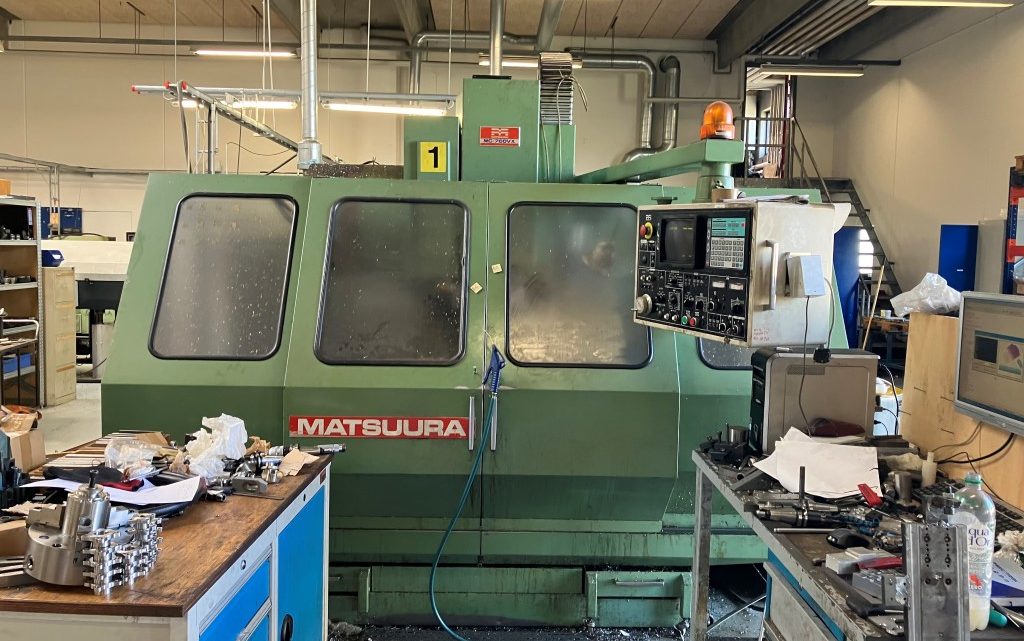
Here’s a detailed guide (in English) to help you avoid common pitfalls when buying a used/second-hand/surplus Matsuura MC-760VX vertical machining centre (VMC) made in Japan. These apply especially to older machines and should help you assess condition, suitability, cost-risk and support viability.
Why this machine is noteworthy
- The MC-760VX offers sizeable table/work envelope (for example reported table size ~45.3″ x 16.1″ and travels ~29.9″ × 17.3″ × 19.1″) in one listing.
- Spindle taper typically BT40 and spindle speeds ~6,000 rpm in many listings.
- Designed by Matsuura, a respected Japanese manufacturer — good base, but age and condition matter greatly.
Key areas to inspect & common risks
1. Work history & usage
- Ask how many cutting hours the machine has undergone (not just hours powered on). Heavy usage shortens life of ball screws, ways, spindle.
- What materials were machined (e.g., hard alloys, heavy parts vs light finishing)? Harder jobs accelerate wear.
- Pitfall: Seller cannot provide reliable history or gives vague “runs fine” statement. That’s a red flag.
2. Mechanical condition (ways, screws, spindle)
- Inspect spindle for run-out, bearing noise, vibration. A worn spindle is expensive to repair.
- Check axis plays/backlash: ball screws, linear guides, table travel should have minimal looseness. Test for backlash in all axes.
- Check table surface and fixture points: any heavy damage, welded repairs or bad wear indicates prior abuse.
- Check physical condition: rust, corrosion, coolant leakage, missing guards or covers—these signal possible maintenance neglect.
- For MC-760VX, verify the tool changer (listed 30-station in some specs) is fully operational with no mis-loads.
- Pitfall: Machine looks cosmetically okay but after install you find large backlash or spindle bearing issues: big cost.
3. Control / electronics / software support
- Determine the exact CNC control: many units list a Yasnac MX3 (or similar) on this model.
- Ask: Are parameter backups available? Has the control board been refurbished? Are spare boards or modules still available?
- Check display condition, buttons, keys – missing or broken panels reduce usability and may signal heavy wear.
- Pitfall: Older unsupported control may mean long downtime if a module fails, or high cost to adapt newer control.
4. Spare parts & service support
- Verify availability of genuine spares (belts, ball screws, linear guide kits, spindle bearings) for MC-760VX in your region.
- Has any major component (spindle, ball screws, drives) been replaced? If yes, get proof of OEM parts and date of replacement.
- Pitfall: Bought cheap but later find that critical bearings or parts have 6-12 month lead time or are obsolete → big unexpected cost.
5. Fit for your production & future
- Confirm table size/travel match your part sizes: e.g., the MC-760VX table listed ~45.3″ × 16.1″, travels ~30″×17″×19″.
- Consider spindle speed/taper vs your tooling: if you have high-speed or large taper requirements, this machine may be limiting.
- Think ahead: Will your part mix evolve? If you only buy for current job, you may outgrow it soon.
- Pitfall: Buying a machine that seems “just okay” now but becomes bottleneck soon.
6. Hidden costs & installation risks
- Factor in transportation, rigging, installation, leveling & alignment. Used machines may need more effort (old foundation, re-leveling, floor repair).
- After installation you may need calibration, axis alignment, tramming – budget for that.
- Inspect utilities: power requirement, coolant system status, chip management, safety guards – used machines may lack upgrades.
- Pitfall: A cheap purchase but high commissioning/setup cost turns total cost far higher.
7. Documentation, provenance & condition assessment
- Request original manuals, wiring diagrams, parts lists, service logs. A machine with complete documentation is far safer.
- Confirm any modifications (e.g., control retrofit, non-original spindles, removed guards) and assess impact.
- Test run: ideally witness machine under load, inspect cut quality, surface finish, tolerance capability.
- Pitfall: Machine sold “as-is” with no inspection or proof of condition — high risk of “unknown” problem.
8. Accuracy & alignment checks
- After moving machine you should check all axes alignment, spindle taper alignment, table flatness, and machine geometry.
- Ask: Has recent calibration been done? What were the results?
- Pitfall: Poor alignment results in scrap, rejects, downtime until corrected.
9. Previous repairs or major replacements
- Ask: When was last spindle rebuild? When were ball screws replaced? What parts were replaced and were OEM parts used?
- A machine near major replacement cycle may need large investment soon.
- Pitfall: Buying “cheap” but shortly after you need heavy rebuild — cost you more.
10. Warranty / after-sale support
- Does the seller provide any short-term warranty or “guarantee” on used machine condition?
- If sold strictly “as-is”, you bear all risk of immediate failure.
- Pitfall: No safety net means your risk is higher — plan accordingly.
Summary: Key take-aways
- Don’t let price alone dictate decision — a low purchase price may hide high future cost.
- Insist on inspection, test run and measurable proof of condition.
- Check support for parts, service, control. Older Japanese machines are good, but only if well-maintained.
- Ensure machine aligns with your production needs now and in near future.
- Budget for total cost: purchase price + transport + installation + set-up + potential repairs.
- Ensure documentation and honest history — this significantly reduces risk.