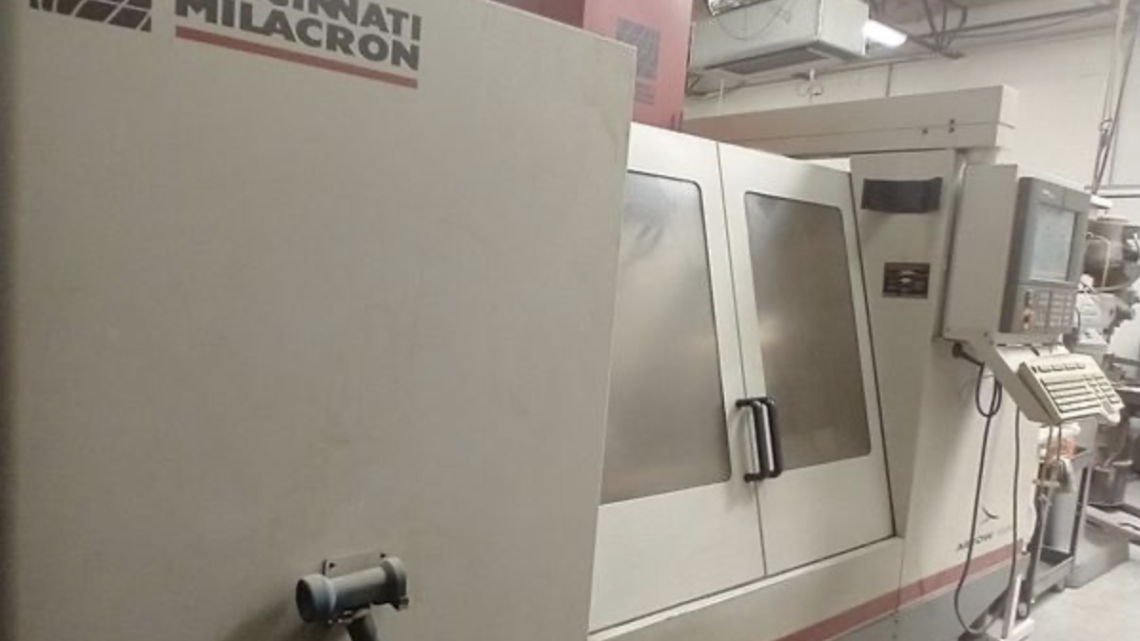
From Factory Floor to Your Workshop: Evaluating a Pre-Owned , Used , Secondhand, Surplus CNC Machines Before Purchase CINCINNATI ARROW 1000 CNC Vertical Machining Center made in USA
When evaluating a pre-owned / used / surplus CNC vertical machining center such as a Cincinnati Arrow 1000, you want a systematic checklist plus technical knowledge specific to that model. Below is a guide structured in phases—pre-screening, in-person inspection & testing, and post-evaluation—along with model-specific pointers (based on available specs). Use this to reduce your risk and help you negotiate or reject poor offers.
1. Pre-Screening & Documentation
Before visiting the seller or factory, gather as much information remotely as possible. This helps you filter out unsuitable machines and arrive with relevant questions.
Key Data to Request
| Item | Why It Matters | What to Look For / Questions to Ask |
|---|---|---|
| Machine model, serial number, year of manufacture | Confirms machine identity, helps find parts & manuals | Verify “Arrow 1000” labeling; serial number helps trace history |
| Control system & software version | Determines compatibility, support, ease of use | Does it have Acramatic 2100, Siemens, or another CNC? (Many Arrow 1000 units use Acramatic 2100) |
| Total cutting (load) hours / runtime log | More telling than just “powered-on” time | Ask whether there is a record of hours under load (metal cutting) |
| Maintenance / service records | Reveal how well the machine was cared for | Invoices, parts replaced, preventative maintenance logs |
| List of included accessories, upgrades or modifications | Some “extras” may add value or issues | Probing systems, tool changer, coolant system, retrofit spares |
| Spare parts inventory | Helps with future downtime risk | Is there a spindle, controller, tool changer spares, ball screws etc.? |
| Reason for sale | Might hint at hidden defects | Is the owner upgrading, relocating, or is the machine failing? |
| Photos / video of the machine in operation | Gives you a first impression | Observe chip conveyor, coolant, panel condition, motion of axes, wiring |
If the seller cannot or will not provide much of this, that’s already a red flag.
Also, do a spec-check: understand the Arrow 1000’s baseline specs so you know what tolerances you should expect. From published data:
- Travel: X ≈ 1,020 mm (40″), Y ≈ 510 mm (20″), Z ≈ 560 mm (22″)
- Table: ~1,120 × 510 mm (≈ 44″ × 20″)
- Spindle speed: 60 – 8,000 RPM
- Tool changer capacity: 21 stations (CAT/ISO 40 or BT40)
- Approx machine weight and dimensions: quite heavy, requiring adequate floor structure
Use these as reference to detect deviations (for example, if the Y travel is much smaller, or if someone claims a 10,000 rpm spindle but the machine’s mechanical design might not support it).
If after pre-screening the seller seems forthcoming and the machine looks promising, schedule an in-person inspection.
2. In-Person Inspection & Functional Testing
When you visit the site (factory or warehouse), be systematic. You may want to take (or bring) a technician or machinist who can operate test cuts. Below is a prioritized checklist across mechanical, electrical, control, and operational domains.
2.1 Visual / Exterior Inspection
- Overall cleanliness, presence of rust, corrosion, or pitting—especially on slideways, covers, table, base
- Signs of damage, repairs, welds, missing covers or panels
- Check for oil leaks, coolant leaks, seepage around seals
- Condition of covers, bellows, way guards (are they properly installed, torn, patched?)
- Observe wiring routing and protection, check for splices, mismatched wiring, exposed wires
- Condition of the chip conveyor, coolant sump/tank, filtration, hoses, pumps
2.2 Mechanical Integrity & Motion Checks
- Guideways and Linear/Box Ways
– Move axes manually (with the drive off, if possible) and feel for binding, “notches,” grit
– Use a dial test indicator (DTI) to test for straightness, wear, pitch among axes
– Inspect ways for scoring, corrosion, pitting or unusual wear - Ball Screws / Leadscrews / Nuts
– Backlash measurement: push/pull in both directions, quantify the lost motion
– Listen for screeching or inconsistent friction during travel
– Check coupling joints for looseness - Spindle & Bearings
– Run the spindle at multiple speeds (low, medium, high) and listen for unusual noises, chatter, grinding
– Check for runout at the spindle nose (e.g. with a high-precision test indicator on a known reference tool)
– Check the taper (use test tool holder, check fit, test with feeler gauges)
– Inspect spindle internals if accessible (bearings, seals, cooling) - Brakes & Stops
– On a rapid stop or command, does the spindle decelerate properly (test M5 or equivalent)?
– Check limit switches, overtravel stops, axes homing features - Tool Changer / Magazine
– Cycle the tool changer through all stations multiple times
– Check that each pocket loads/unloads correctly, no jamming or mis-indexing
– Inspect magazine mechanics, grippers, fingers, air blow-off (if used) - Axis Drives / Motors
– With servo drives energized, jog the axis under light load, moderate, and near maximum speed
– Listen to the motor, check for noise, thermal behavior (is motor heating excessively?)
– Check encoder feedback (if accessible) for clean signals
– Inspect motor cables, connections, shielding
2.3 Control, PLC, Electrical & Interface
- Control Panel & Human-Machine Interface (HMI)
– Test every button, switch, handwheel, emergency stop, override knobs
– Display clarity, flickering, ghost images, dead pixels
– Check if the control can execute existing programs, load new ones, jog axes, etc.
– Check communications ports (RS-232, USB, Ethernet) if present - CNC Control Software / Logic
– Check the version of control software, whether it’s licensed, whether upgrades are possible
– Does it allow DNC / network interfacing ?
– Are offsets, macros, tool libraries intact and functioning?
– Are there custom patches or modifications (which may complicate repair)? - Electrical Cabinet / Power & Wiring
– Open the cabinet and visually inspect: look for dust, burnt wiring, resin, signs of overheating
– Look at PCB boards, connectors, relays, contactors—any discoloration or heat damage
– Ensure fans, filters, ventilation are working
– Check fuses, breakers, overcurrent protection
– Check whether power supply is stable, grounding is proper - Safety Devices & Interlocks
– Door interlocks, safety switches, covers, shields
– Are all safety switches operational? Does opening a door during operation shut down motion?
– Condition of safety light curtains or guards (if present)
2.4 Operational / Load Testing & Cutting Trials
If the seller allows, this is one of the most revealing tests. A machine may “look good” but fail under load.
- Idle Movement / Rapid Traverses
– Command rapid moves in all axes, check for smooth, consistent motion without chatter or vibration
– Verify that highest rapid rate is close to spec (for Arrow 1000, published ~787 IPM ~ ≈ 20 m/min for X/Y rapid)
– Monitor motor currents—are any drives overloaded or saturating? - Light Cuts / Profiling
– Run a light milling or contouring cut and inspect surface finish, chatter, dimensional accuracy
– Make test features (slots, pockets) and measure tolerances versus commanded values
– Test near full depth or heavier cut to see how the machine behaves under load - Rigid Tapping / Threading
– If the machine supports rigid tapping, test that functionality (vital for many shops)
– Inspect whether the tap completes threads correctly without chatter or tool damage - Spindle Thermal & Endurance Behavior
– Run the spindle under load for an extended period (e.g. 30–60 minutes) and observe for vibration drift, temperature rise, oil leakage, noise changes
– Re-check runout after warm-up - Backlash & Repeatability Tests
– Use gauge blocks or calibration artifacts to test repeatability / positioning error over multiple moves
– Test across travel extremes, midrange, and reversals - Check for Abnormal Sounds / Vibrations Under Load
– Listen for knocking, oscillation, squeals, grating
– Feel for vibration transmitted to table or frame
After testing, repeat some of the earlier measurement (backlash, runout) to see if things shift after warm-up or under load.
2.5 Measurement & Metrology Checks
To validate the machine’s accuracy, bring or ask for:
- A precision test mandrel, gauge block set, or ring gauge
- A precision indicator / DTI
- Possibly a laser interferometer or ballbar test (if available)
- Documented tests: backlash, straightness, squareness, repeatability
If the machine fails these basic standards by more than acceptable tolerance, the cost to repair/refurbish may exceed savings of buying used.
2.6 Floor, Foundation & Infrastructure
- Check whether the machine is currently mounted with grouting, leveling pads, shimmed base. That gives insight how well it was installed.
- Verify floor load capacity (this machine is heavy)
- Check whether utility connections (power, coolant, compressed air) are adequate
- Access and rigging: is there sufficient door height, crane or lifting points to move the machine out?
- Verify cooling, air supply, dust control, and shop ventilation
3. Post-Evaluation & Decision Criteria
Once you’ve done the in-person evaluation, analyze your findings. Here are the criteria you should use to decide whether to proceed:
Cost vs. Risk Estimate
- Estimate the cost to repair or refurbish (replace spindle bearings, ball screws, control upgrades, wiring, alignment)
- Compare that cost plus purchase price vs. buying a newer or reconditioned machine
- Factor in downtime, opportunity cost, and parts availability
Parts & Support Risk
- How available are parts (spindles, control components, electronics) for the Arrow 1000?
- Are there CNC techs near you (regionally) who can service the control (Acramatic / Siemens etc.)?
- Consider whether the control can be replaced or upgraded if obsolete
Remaining Useful Life & Precision Budget
- Based on wear, can the machine meet your tolerance/specification needs (e.g., ± 5 µm, ± 10 µm, ± 25 µm)?
- How many more years of useful life are realistic, given wear and spare part support?
Negotiation Leverage
- Use observed defects or deficiencies as bargaining tools
- Ask for parts, spares, or warranties as part of the deal
- Demand a test-cut and guarantee performance (e.g., 90 days)
Exit / Contingency Planning
- If you accept the machine and later find latent defects, have a fallback (return, repurchase rights, escrow)
- Plan for scheduled maintenance, calibration, and monitoring
4. Model-Specific Considerations: Cincinnati Arrow 1000
Because you asked specifically about the Arrow 1000, here are some extra considerations based on what is known:
- Spindle and RPM Range: Many Arrow 1000s are rated 60–8,000 RPM. Some older marketing or seller claims may overstate the upper rpm.
- Control system (Acramatic 2100 / PC version): Some units use the Acramatic 2100 control; check whether the control is intact, supported, and whether its software is intact or modifiable.
- Fourth-axis prewire: Some machines are offered pre-wired for 4th axis though not always equipped. If you need rotary/4th axis, verify it is fully wired and functional.
- Tool changer (21 tools): This is common for this model. Ensure full functionality.
- Heavy structure / rigidity: The Arrow 1000 is a solid machine. If the seller has used it for heavy cutting, expect more wear in guideways, screws, etc.
- Parts Obsolescence: Because this is an older design, some OEM parts may be obsolete. Be ready to use remanufactured parts or aftermarket options.
- Weight & foundation: These machines are heavy and may require substantial foundation or shop reinforcement.
5. Summary: Go / No-Go Indicators
Here’s how to interpret your results:
| Positive Signs (go) | Warning / Rejection Signs (no-go) |
|---|---|
| Clean, well-cared-for exterior, all covers intact, good maintenance logs | Excessive rust, patched covers, missing panels |
| Spindle runs smoothly at all speeds, low vibration, stable | Grinding noise, chatter, bearing rumble, overheating |
| Low backlash, good repeatability in motion tests | Large backlash, shift in accuracy after warm-up |
| Tool changer cycles reliably | Tool changer hangs, mis-indexing, broken pockets |
| CNC control fully functional and software healthy | Control is damaged, missing modules, custom hacks |
| Parts availability is solid, support network in reach | Obsolete control or parts with no supply chain |
| Test cut produces good finish and meets tolerances | Poor surface finish, dimensional deviation, chatter |
| Costs of repairs are manageable relative to machine value | Required repair cost is high or unpredictable |
If many of the “warning” signs appear, it may be safer to walk away or negotiate heavily.