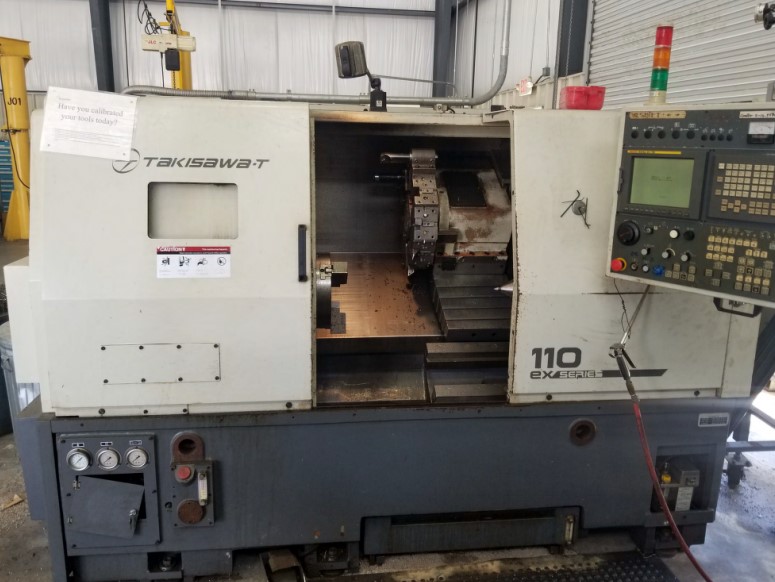
Avoid Costly Mistakes: Professional Tips for Purchasing a Pre-Owned / Second-Hand / used Takisawa T-110EX CNC Turning Center
Here are professional tips and a checklist you should use when evaluating a used Takisawa T-110EX (or similar Takisawa “EX / T-110 / EX-type” series) CNC turning center. The more careful you are now, the less risk of expensive surprises later.
I’ll break down:
- What to know ahead (typical specs / red-flags)
- What documentation and history to demand
- Visual & structural inspection
- Mechanical / motion tests (without cutting)
- Spindle / chuck / tool systems checks
- Control, electronics & software inspection
- Precision / test cut verification
- Hidden cost risks & failure modes
- Deal structuring & negotiation protections
- Major red flags / when to walk away
1. What You Should Know Ahead (Benchmarks & Warning Signs)
Before you visit, collect any spec sheets or used listings for T-110EX machines so you know “what’s reasonable” and where to push back. For example:
- A used listing for a 2007 Takisawa T-110EX shows:
- Swing ~ 19.5″ (≈ 495 mm)
- Bar capacity: 3″
- Spindle max speed: 3,500 rpm
- Control: Fanuc 21i-TB
- Distance between centers: 28″
- 12-station turret
These serve as rough reference points. If a seller claims wildly different numbers (e.g. 10,000 rpm, bar capacity 6″, turret 24 stations) you must demand proof and test them.
Also note Takisawa makes many lathe models (EX, NEX, LA, etc.) so confirm exactly which variant you are evaluating.
2. Documentation & Machine History (Essential)
Ask for, demand, and verify the following before getting too committed:
- Complete maintenance logs / repair invoices (bearing changes, major overhauls)
- Control / parameter backups (tool libraries, custom macros)
- Electrical schematics, wiring diagrams, parts catalogs
- Records of any modifications or retrofits (spindle, turret, motors)
- Usage history: hours, shifts, materials processed
- What is included in sale: chucks, tooling, spare parts, coolants, peripherals
- Recent calibration / alignment / test reports (if done)
- Proof of parts availability (especially for older Takisawa / Fanuc modules)
If the seller cannot produce credible documentation, treat the deal as much higher risk.
3. Visual & Structural Inspection (Before Power-Up)
Before applying power, do a careful “walk-around” inspection to spot obvious defects.
- Castings & frame: look for cracks, weld repairs, repairs, distortions
- Guideways, ways, sliding surfaces: check for rust, pitting, scoring
- Way covers, bellows, guarding: missing / torn covers are red flags (chips and grit intrusion)
- Spindle nose, headstock, chuck mounting surfaces: look for corrosion, damage, nicks
- Turret and arms: check for bent or misaligned arms, worn pocket edges
- Electrical cabinet & wiring: inspect enclosures for corrosion, water stains, missing covers
- Coolant / chip conveyor / pumps: signs of leaks, rust, neglect
- Anchoring and foundation: check for evidence of machine relocation, re-anchoring, floor damage
A machine that’s been neglected superficially often hides deeper internal issues.
4. Motion / Mechanical Tests (Without Cutting)
If possible, power the machine and run motion tests before cutting anything.
Control Boot & Safety
- Power up the CNC, watch for alarms, missing modules, or error messages
- Test emergency stops, interlocks, panel switches, displays
Axis Movement & Backlash
- Jog X / Z axes (and any other axes) through their full range at varying speeds
- Reverse direction to test for backlash (use a dial indicator)
- Watch for “dead zones,” jerky motion, sticking segments, uneven resistance
- Listen for metallic rubbing, scraping, or irregular noises
Couplings & Linkages
- Check drive couplings between motors and screws for looseness
- Check mechanical linkages (gears, range selectors) for play or sloppy operation
5. Spindle, Chuck, Turret & Tooling Systems
These are among the highest cost repairs — test thoroughly.
Spindle / Chuck
- Run spindle (no load) through speed range; listen for bearing hum, vibration, wobble
- Mount a test bar / mandrel, measure radial & axial runout over full rotation
- Examine spindle nose & taper for scoring, wear, burrs
- Test drawbar / chuck clamping / unclamping (if hydraulic / pneumatic)
Turret / Tool Changer
- Cycle the turret / tool changer through all stations multiple times
- Check pick / place repeatability, hesitation, indexing errors
- Verify that every pocket seats properly and tight
- Test tools under idle (drill / live tooling, if present) for vibration or runout
Tool Holders / Fixtures
- Inspect tooling mounting surfaces for wear
- Check collets, holders, fixture fit, clearance, play
6. Control / Electronics / Software Examination
A strong mechanical machine can still fail due to electronics issues.
- Open the control cabinet: check boards for burn marks, corrosion, capacitor bulge, dust
- Boot the CNC and check parameter memory, alarm logs, board presence
- Test panel functions, buttons, overrides, encoders
- Inspect servo drives, power modules, feedback cables & connectors
- Cycle the machine (idle) and watch for errors, overheating, drive issues
- Verify software versions, licensing, backups, parameter files
7. Test Machining & Accuracy Verification
This is your “trial by fire”—see if the machine can still make accurate parts.
- Mount a known reference bar; check straightness, taper, runout at multiple points
- Retract / return to same position to test repeatability
- Perform a finishing cut on sample material; measure diameter, straightness, surface finish
- Run tests near extremes (start, mid, end of travel) to see if precision degrades near limits
- Warm up the machine (run cycles for 20–30 minutes) then re-check for thermal drift
8. Hidden Cost Risks & Likely Wear Items
Be realistic: even good machines often need refurbishment. The major risk areas include:
- Spindle bearing wear / rebuild or replacement
- Ball screws / nut wear and backlash
- Wear on guideways, ways, scrapping needed
- Turret drive / indexing gear wear
- Electronics / servo drive or control replacement
- Cable harness, connector failures
- Plumbing, coolant pump, filtration system repairs
- Parts scarcity for older Takisawa / Fanuc modules
- Transport, installation, leveling, calibration
- Calibration and alignment after relocation
Budget a refurbishment reserve (10–20 % or more) to cover hidden repairs.
9. Negotiation & Contract Safeguards
Use your inspection leverage to protect your investment.
- Require a test / acceptance period during which you can run all motions, test cuts, accuracy checks
- Hold back payment until machine meets agreed criteria
- Mandate delivery of all documentation (manuals, backups, schematics)
- Get a written condition disclosure from seller listing known issues
- If possible, negotiate a short-term warranty (30–90 days) on critical systems
- Clarify responsibilities for transport, rigging, installation, leveling
- Request inclusion of chucks, tooling, fixtures, spares
- If feasible, request seller’s assistance in initial setup / alignment
10. Red Flags / Walk-Away Conditions
Some signs are too serious or too risky to accept lightly. If you see any of these, consider rejecting or demanding a big discount:
- Seller refuses full inspection, spindle test, or motion testing
- Excessive backlash, jerky or inconsistent motion in axes
- Spindle vibration, hum, unacceptable runout
- Turret misindexing, dropped tools, hesitation
- Control or electronics faults, missing modules, corrupted parameters
- Electrical cabinets with burn marks, corrosion, missing parts
- Cracked castings, structural damage, sloppy repairs
- No way covers or guards (chip ingress risk)
- Critical parts or modules unavailable or obsolete
- Poor modifications, mismatched retrofits without documentation