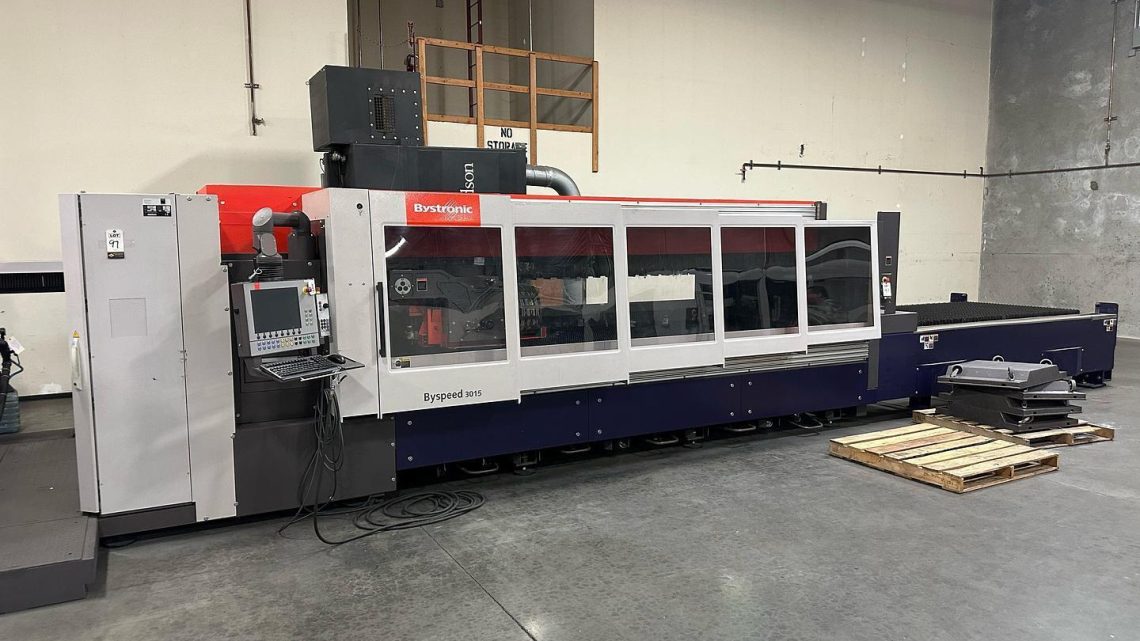
Avoid Costly Mistakes: Professional Tips for Purchasing a Pre-Owned / Second-Hand / used Bystronic BySpeed 3015 CNC Laser?
Here are detailed professional tips to help you avoid costly mistakes when buying a pre-owned Bystronic BySpeed 3015 laser cutter. I’ll cover what specs/features you should verify; what commonly goes wrong; what to inspect & test; what questions to ask; red flags; and how to estimate the “true cost” beyond purchase.
What to Know First: BySpeed 3015 Baselines & What You Should Expect
Before inspecting, make sure you know what a properly functioning BySpeed 3015 is supposed to deliver. These benchmarks help you spot under-spec or worn-out machines.
| Specification / Feature | Typical Value / What to Look For |
|---|---|
| Cutting area (X × Y) | ~ 3,000 mm × 1,500 mm (≈ 5′×10′) is common. The shuttle table version is typical. |
| Laser source type and power | CO₂ versions are older; depending on year, power may be ~ 4.4 kW for many used pieces. |
| Control system / interface | Bystronic CNC / ByVision (touch panel) / up-to-date control modules. Shuttle-table or fixed table, depending on model. |
| Auxiliary systems | Chiller(s), gas supply (O₂ / N₂ / compressed air), exhaust/ventilation, optics (mirrors, lenses), safety guards, shuttle table or material handling. |
| Cuts & material capability | Depending on laser power; typical capable thickness values: mild steel, stainless steel, aluminum. Sheet quality: ability to cleanly pierce, cut without excessive dross or heat distortion. |
What Common Problems / Wear Items to Watch Out For
Based on forum reports & used-machine advertisements, these are often the trouble areas in BySpeed / similar CO₂/older laser systems:
- Optical path degradation (mirrors, lenses, alignment) → leads to poor beam quality, reduced power on material, bad cut quality.
- Laser tube / resonator age / power output decline; especially with CO₂ systems, tubes degrade, lose output, may need replacement.
- Gas supply issues — leaks, poor purity, pressure fluctuations; improper gas assist (oxygen vs nitrogen) leads to dross, poor edges.
- Cooling system problems (chiller, water flow, heat exchange) — overheating will damage optics, tube, mirrors.
- Motion system wear: belts, guides, linear rails, motors; shuttle tables (if applicable) have wear, alignment issues.
- Control / electronics aging: control boards, power supplies, DACs; things like display units, HMI, etc may be failing.
- Consumables & replacement parts scarcity: nozzles, lenses, mirror mounts, bearings, etc may cost a lot or be hard to source.
- Material handling or load table wear (shuttle table, slats, bed, clamp systems). These often get banged, corroded, warpage.
- Safety & compliance issues: faulty guards, incorrect interlocks, exhaust or fume extraction not up to standard.
Inspection & Testing: What to Check On-Site
When inspecting a used BySpeed 3015, try to see the machine operating under use (ideally cutting material similar to what you’ll use). Below are what you should inspect or test, with items that often get overlooked.
| Area | What to Test / Inspect | Specifics to Check |
|---|---|---|
| Laser Resonator / Tube & Power | • Verify model, year, condition of laser tube / resonator; ask about its usage hours. • Test current output: do a full pierce + cut; measure/compare cut speeds vs spec; see how specs degrade. • Check tube cooling, seal integrity, any leaks. • Any history of tube replacement? • Measure voltage/current draw under load. | |
| Optics / Beam Path | • Inspect mirrors, lenses for scratches / damage / carbon buildup. • Check alignment: you might test beam focus or nozzle adherence. • Check whether spare optics are included or accessible. • Look for beam drift or instability during operation. | |
| Gas Supply System | • Inspect whether oxygen and/or nitrogen assist gas systems are present; are regulators functioning; hoses in good condition; purity of gases; pressure stable. • Any history of leaks, assist gas usage (oxygen vs nitrogen) appropriate for material types. • Check that gas supply systems (valves, manifolds) are functioning properly. | |
| Cooling / Chiller / Heat Management | • Ensure chiller(s) are working; coolant is clean; flow rate adequate. • Inspect cooling for tube, optics etc. • Heat build up during longer cuts: does power drop, does beam quality degrade? • Check temperature sensors, alarms, interlocks. | |
| Motion / Mechanical Systems | • Move all axes: X, Y, Z (if applicable) and shuttle table (if present); look for smoothness, no backlash, no slop or stiffness. • Inspect guides, rails, belt drives, gearboxes: lubrication, wear, alignment. • Test table flatness / bed alignment; check if slats or bed have been replaced or are warped. • For shuttle tables: check travel, stops, reference sensors; whether movement is consistent. | |
| Control / Electronics / Software | • Power the control unit; test all interface elements (buttons, touchscreen, displays). • Check CNC program input/ storage; verify backups, parameter storage. • Review error / alarm history; what recurring issues are logged. • Inspect wiring, control cabinets: routing, cleanliness, water or dust ingress, overheated components. • Check that software is up-to-date (if relevant), and whether upgrades or firmware patches are available. | |
| Cut Quality Test | • Do sample cutting of mild steel, stainless, or aluminum (or whatever you plan to cut). Inspect edge finish, kerf quality, pierce quality, dross, warping. • Try cutting thin and thicker materials; see how cut speed and quality change. • Check for oscillations, inconsistent line edges, soot or burn marks. • See behavior when continuous runs are done (thermal effects, drift). | |
| Consumables & Spares | • Examine condition and remaining life of nozzles, lenses, mirrors. • See if spares are included or easily purchasable. • Ask about slats, bed supports, etc. • Check condition of filters, air supply, assist gas related components. | |
| Safety & Environment | • Safety guards / covers are intact; welds / covers protecting optics / beam path. • Fume extraction, ventilation present and working. • Emergency stop, interlocks (door sensors etc) functioning. • Floor anchoring / leveling: is machine properly set up or has it been moved poorly. • Cleanliness: presence of dust, spatter, rust around sensitive areas. | |
| History & Usage | • Total machine hours, but more importantly hours under load / cutting hours. • Material mix used historically (hard steel, thick plates, frequent pierces etc). • Maintenance history: when optics / tube / gas systems serviced; when belts, rails replaced. • Any accidents or overloads. • Environment: humidity, dust, ambient temperature; whether machine has been idle at times; how it was stored. |
Questions You Should Ask the Seller
To get full context and anticipate cost, ask these before finalizing the deal:
- What is the laser tube / resonator model, year, total hours? When was it last replaced or refurbished?
- What is the condition of the optics: mirrors, lenses, focus head; and were they replaced recently?
- What frequent maintenance has been done (or neglected)? For example, optics alignment, gas system, cooling, belts, rails. Do you have records?
- What materials have been cut (thickness, steel / aluminum / stainless etc.), how often, and what gas assist usage?
- What is the power output vs what is claimed (do you have test cuts or records)?
- are all auxiliary systems included (gas supply, chiller, exhaust / fume extraction, filters, tables/slats)? Are they working properly?
- How old or worn are consumables: nozzles, lenses, mirror mounts, slats – and are spares included or obtainable?
- What condition is the motion system in: belts, linear guides, shuttle table (if present), mechanical wear / alignment?
- What control / software version is installed; are there known issues; is there local service support for spare parts or firmware updates?
- Safety features: all interlocks, guards, emergency stops etc. included and working? Has it been compliant with safety regulations where it was used?
- Why is it being sold / replaced? If it’s because it’s reaching end of useful life, or because reliability has been dropping, that gives insight.
- Trial run or cut test: can I see the machine cutting a part similar to what I will use, under load, over an extended period?
Red Flags
Here are the things that often indicate a machine will cost more post-purchase than it seems, or may be unusable without major investment:
- Laser tube nearing end‐of‐life: high number of hours, unstable output, frequent replacement history.
- Optics heavily damaged or misaligned, or found to be “patched” / poorly maintained.
- Cooling or chiller broken or undersized; overheating during longer runs.
- Gas assist system leaking or partially failing; issues with pressure or gas purity.
- Major wear or damage in motion systems: warped bed/slats, damaged rails, belts slipping, shuttle table misaligned.
- Controls or electronics showing age: intermittent faults, failing displays / old control boards with scarce spares.
- Missing auxiliary systems (gas supply, exhaust), or done poorly.
- Excessive rust, corrosion, water damage. Especially in optics, cables, electrical cabinets.
- Safety system deficits: guards removed, interlocks bypassed, emergency stops non-functional.
- Poor sample cuts (lots of dross, incomplete pierces, warped parts).
Estimating True Cost of Ownership & Negotiation Strategies
Buying used is just the first stage. You must estimate the downstream cost to bring the machine reliably up to production standard. Use these to decide whether the asking price is fair / whether to negotiate / whether a different machine would be better.
- Consumables & Optics Replacement Costs: Estimate cost for replacement lenses, mirrors, nozzles, slats. These wear fast and cost can be high.
- Laser Tube / Resonator Life: If the tube has many hours, it may need replacement soon. Know cost and lead-time for a replacement.
- Spare Parts Availability & Cost: Are spare optical parts (mirrors, lens assemblies), motion components, gas regulators, etc. still readily available? What is delivery time / cost?
- Utility Infrastructure: Gas supplies, quality (e.g. purity of nitrogen/oxygen), cooling water & chillers, proper exhaust / fume extraction, power supply voltage & stability. If not existing or substandard, cost to upgrade.
- Maintenance & Service: Costs for periodic maintenance: optics cleaning/alignment, rail maintenance, belt replacements, calibration etc. Also, whether you can hire local technicians with experience on Bystronic machines.
- Downtime & Commissioning: Time to relocate, rig, level, calibrate, possibly replace parts, perform trial cuts; potential loss of productivity before fully operational.
- Regulatory / Safety Compliance: Costs to ensure the machine meets local safety, environmental regulations: guarding, fume extraction, emission, electrical safety.
Use issues you find during inspection as negotiation points. For example, if optics are worn, or if tube hours are high, ask for a discount that accounts for that expected replacement cost. If certain parts or auxiliary systems are missing, include those costs