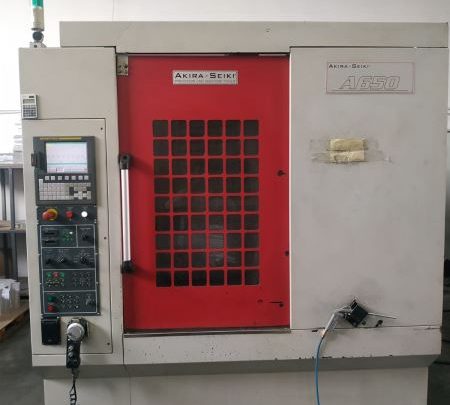
Avoid Costly Mistakes: Professional Tips for Purchasing a Pre-Owned / Second-Hand / used AKIRA SEIKI A650?
Here are professional tips and red flags to watch out for when considering a used Akira Seiki A-650 machining center. It’s a capable machine, but like any large CNC machine, there are many possible trouble spots. Using the checklist below will help you avoid getting stuck with hidden defects or expensive repairs.
What the A-650 Should Be — Key Specs & Capabilities
From listings & catalogs for the Akira Seiki A-650, here are typical specs so you can compare what the seller claims:
| Spec | Typical Value |
|---|---|
| Travels (X × Y × Z) | ~ 650 mm × 350 mm × 400 mm |
| Pallet / Table Size / Twin Pallet | Pallet ~ 650 × 350 mm; many units have twin pallet setups. |
| Max Table Load | ~ 120-300 kg (depending on version) |
| Spindle Speed Range | ~ 150 to 12,000 rpm (standard) |
| Tooling | 24-station tool magazine; Tool shank: HSK-63A or BT40; max tool diameter ~ 60-63 mm; tool change times in the ~1-1.5 second range tool-to-tool in good setups. |
| Rapid Traverse Rates | X / Y / Z rapid moves around ~ 72 / 48 / 72 m/min in many machines. |
Knowing these lets you verify claims and spot if the machine has been downgraded, configured poorly, or has performance that’s degraded.
What to Inspect / Test In Person
Below is a detailed checklist of what to examine and test. Bring measurement tools, a test program, and plan to see the machine in operation (if possible, with a sample part).
| Area | What to Test / Inspect | Why It’s Important / Failure Modes |
|---|---|---|
| Spindle & Bearings | • Run the spindle at various speeds: low, medium, high. Listen for humming, grinding, vibration. • Measure run-out at spindle nose (chuck or tool holder) with a dial indicator. • After a period of running, feel for heat on the spindle housing/bearings. • Inspect spindle taper and chuck mounting face for fretting, wear, corrosion. • Check tool change / clamp mechanism: whether grippers / fingers / drawbar are in good shape. | Spindle defects are expensive, reduce precision and surface finish. Bearings wear out gradually; fretting/taper damage reduce tool holding and can lead to inaccuracy or early failure. Tool change parts wear can slow down or fail under load. |
| Axis Motion, Guideways, Ball Screws, Lubrication | • Move all axes through full travel: check for smoothness, no binding or “sticky” zones. • Check backlash in each axis by moving forward then reversing; measure the lost motion. • Visually inspect guideways for wear, scoring, rust, pitting. • Check ball screws and nuts: any play, unusual noises, misalignment. • Verify lubrication system for axes and screws is working properly; look for dried up or blocked lubrication lines. | Wear here reduces accuracy, repeatability, leads to scrap parts, accelerates wear in other components. Hydraulic/coolant/chip damage often contributes. Poor lubrication severely shortens life. |
| Pallet / Twin Pallet / Table & Work Holding | • If twin pallet, test pallet change over: speed, repeatability, mechanical play, fit in both pallets. • Inspect table in both pallets: flatness, warpage, table mounting holes/slots condition. • Check that table load rating is accurate: test with weight similar to what you will load. • Check spindle-to-table distance, whether the “nose to table” clearance is claimed and accurate. | Pallet systems are mechanically complex; misalignment between pallets or sagging under load can cause quality issues. Table wear or damage causes poor fixtures, misalignment. |
| Control / CNC / Electronics | • Power up control: check display, user interface (screen/buttons), emergency stops & interlocks. • Check alarm/fault history: look for repeated errors in axes, spindle overloads, cooling faults. • Inspect electrical cabinet: wiring condition, signs of burn/heat/conduction corrosion; whether connectors are secure. • Check software/firmware version; which control (Mitsubishi, Fanuc, etc.); verify whether all claimed optional features are present and working (high speed tapping, through-spindle coolant, pallet options etc.). • Confirm parameter memory / backups are intact; battery or backup power for memory. | Control issues often are show-stoppers or expensive. Missing or non-functional options reduce utility. Faulty wiring causes intermittent errors and can escalate. Loss of parameters can mean needing to recalibrate or reprogram from scratch. |
| Coolant / Through-Spindle Coolant / Chip Management | • Check coolant tank: cleanliness, clarity, filter condition. • Check if through-spindle coolant (if fitted) works properly: seals, flow, pressure. • Inspect coolant nozzles and systems, chip conveyors or removal: are chips cleared; is accumulation avoided. • Inspect guards, splash covers, protective seals around areas where chips or coolant splash. | Coolant contamination or failure causes corrosion, spindle bearing damage, reduced finish. Poor chip removal causes jamming, damage, more frequent maintenance. |
| Accuracy & Test Cuts | • Run a test program representative of what you will do: roughing + finishing, multiple axes, heavier cuts. • Measure surface finish, dimensional accuracy, repeatability (produce several identical parts). • Warm-up the machine (let run some time), then re-check critical dimensions—thermal drift can surprise. • Check squareness (X vs Y, vertical alignment), check whether spindle is perpendicular, axes orthogonality. | Just seeing machine “move” is not enough—only under actual machining does precision reveal itself. Thermal effects, alignment errors often show after warm-up. |
| Physical Condition & Wear | • Inspect structural components: column, base, knee, spindle housing for cracks, damage, signs of collisions. • Check for rust, corrosion, especially in ways, joints, under covers. • Inspect guards, way covers, splash guards. • Look at tool magazine: worn pockets, damage, whether neighboring tools interfere (clearance). • Check hydraulic or pneumatic components (if any) for leaks, condition of seals. | Structural damage is expensive and difficult to repair. Rust & corrosion accelerate many wear processes. Tool magazine damage leads to tool mis-fit or tool drop. Leakages in hydraulics/pneumatics degrade performance and safety. |
| Usage / Maintenance History | • Ask for machine “on-hours” and “cutting hours” / under-load hours (if possible). • Maintenance logs: when major components were serviced or replaced (spindle bearings, guides, screws, coolant, belts etc.). • Any history of crashes, overloads, or misuse. • Environment history: how clean, dry, how well maintained the machine has been; exposure to corrosive atmospheres or coolant mist. • Owner Manuals, Parts Catalogs, Wiring Diagrams, Software Backups etc. | A well-maintained machine reduces risk of sudden failures. Missing history or unclear usage is a warning. Environmental neglect causes hidden damage. Documentation helps in future repairs. |
Known Weaknesses / Common Problem Areas for Akira Seiki Machines
From repair reports, user forums, and listings, here are issues people often run into with Akira Seiki machines such as the A-650 or similar:
- Spindle issues: Taper wear, corrosion, damaged drawbars, worn tool change grippers / collets. Akira Seiki spindles have been serviced by third parties for issues like worn grippers, drawbars, tool clamp parts.
- Wear in tool change / magazine system: Tool magazine pockets / carousel guards may wear; magazine indexing may degrade.
- Coolant / through-spindle coolant leakage or failure of flow control. Because many versions include through-spindle coolant, seals are critical.
- Table or pallet misalignment, especially when twin pallet systems are used. Pallet change mechanics (mechanism wear, pallet indexing, fit) degrade and lead to geometry issues. The A-650 twin pallet variants are common; assess how tight the pallet fit is.
- Rapid traverse or axis drive degradation: motors or servo systems may lose responsiveness, have slower acceleration if components (motors, belts, guides) are worn.
- Control electronics aging: Mitsubishi or other control panels may have screen dimming, switch wear, parts that are becoming obsolete.
- Chip clearance, coolant management, and guarding often neglected; chip buildup under guards or around moving parts causes hidden damage.
Red Flags / Deal Breakers
If you see any of these, you should negotiate hard, or require repairs, or potentially walk away if the cost of fixing is too high:
- Spindle run-out or vibration or heat that seems abnormal. If even idle speed shows noise or movement at spindle nose, that’s bad.
- Twin-pallet system that is loose, wobbly, or pallet change not precise; or pallet indexing errors.
- Tool magazine / tool changer errors: tools mis-pick, pockets damaged, long change times, or tool seating problems.
- Cooling/through-spindle coolant leaks; flow problems; seal damage; variation in temperature during operation.
- Large backlash or play in axes; jerky motion; binding zones; uneven traverse.
- Rust, corrosion in critical ways or guide rails; way covers or protective shields missing or damaged.
- Electrical or control panel issues: dim/flickering screen; failure of buttons or switches; error logs that show recurring faults.
- No maintenance records, unclear usage hours, or signs that the machine was heavily “beat up” without upkeep.
- Poor test cut results: unable to hold tolerances, accuracy drifting, surface finish poor, corners misbehaving.
- Major components that are known to be expensive: if spindle repair, pallet mechanism, or control electronics are in bad shape, repair cost may be more than what the machine’s residual value justifies.
Cost Buffers & What to Budget In / Negotiation Strategy
When evaluating price / making your offer, build in allowances for possible repairs or replacements. Also, negotiate on terms to ensure you’re protected.
| Hidden Cost / Possible Repair | What to Budget / What to Ask |
|---|---|
| Spindle bearing overhaul / taper & drawbar repair | If signs of run-out or noise, this is a major cost. Ask if spindle has been serviced. |
| Tool changer / magazine repair or pocket replacement | Worn tools or pockets may need refurbishment or replacement. |
| Pallet alignment / twin pallet wear / pallet indexing checks | Pallet mechanics often need adjustment / refurbishment. |
| Axis guides / ball screw repairs if there is backlash, wear or scoring | These are expensive; often labor-intensive. |
| Cooling / coolant system (through-spindle if present) servicing: seal replacement, hose replacement, filters etc. | Through-spindle coolant components deteriorate; seals leak; coolant contamination causes internal damage. |
| Control panel or display repairs / parts (switches, wiring, obsolete boards) | Electronics degrade; sometimes parts are obsolete; budget for backups or refurb parts. |
| General refurbishment: cleanliness, guards, way covers, chip & coolant ducts, safety guards | Machines used hard often neglected here; cleaning & guards replacement help longevity. |
| Transport / Rigging / Installation / Leveling / Calibration | Moving large machines, leveling, aligning, calibration time & material. |
| Spare parts & tooling inventory | Having key spare components (collets, tool holders, drawbars etc.) helps reduce downtime. |
Also, try to negotiate conditions such as:
- Test cuts / acceptance trials: make sale conditional on real test parts or sample production that meets your tolerance.
- Maintenance / repair history documentation: insisted documentation is included.
- Inclusions: tooling, fixtures, spare parts, manuals.
- Warranty or limited guarantee: even short term (30-90 days) helps protection.